Why Consumer Tablets Break on Forklifts

world class forklift-tablet

Consumer tablets are affordable, familiar, and easy to deploy. That makes them tempting for warehouse operations that need a screen for inventory management, barcode scanning, warehouse management systems (WMS), or other forklift workflows.

But a tablet designed for everyday consumer use is not necessarily built for life on a forklift.

Forklift tablet damage can come from a combination of vibration, shock, drops, environmental exposure, vehicle power requirements, and repeated operator handling- conditions that can turn a low-cost tablet into a recurring maintenance problem.

For warehouse and logistics operators, the key question is not whether a consumer tablet can be mounted to a forklift. It is whether the device, mounting system, power connection, and accessories are designed for the conditions in which they will operate.

What damages tablets on forklifts?

The most common causes are:

  • Continuous forklift vibration
  • Shock from uneven warehouse floors
  • Accidental drops and impacts
  • Poor or incompatible mounting hardware
  • Vehicle power fluctuations and connection problems
  • Dust, moisture, and temperature extremes
  • Frequent removal and handling by operators
  • Inadequate protection around ports, connectors, and displays

Each of these conditions can affect device reliability. Together, they can make a consumer tablet a poor fit for continuous forklift use.

1. Forklift vibration is harder on tablets than normal handheld use

A consumer tablet is generally designed to be carried in a person’s hands, placed on a desk, or transported in a bag.

A forklift-mounted tablet experiences something very different: repeated mechanical vibration while the vehicle is moving.

Warehouse floors can include cracks, joints, ramps, uneven surfaces, and other conditions that transmit vibration through the forklift and into its mounting system.

Even rugged hardware has limits. Honeywell’s documentation for its RT10 rugged tablet specifically warns that forklifts with hard wheels or uneven, cracked flooring can create extreme vibration and shock that may result in device or dock failure. The company also notes that inadequate mounting can contribute to damage, interrupted electrical connections, and port failures.

This illustrates an important point about industrial tablet durability:

Rugged hardware alone is not enough. The mounting system must also suit the vehicle and operating environment.

2. Shock and impacts can damage consumer hardware

Forklifts experience sudden shocks that ordinary consumer electronics may rarely encounter.

A device can be jolted when a forklift travels over an uneven surface, encounters a floor joint, or stops suddenly. A tablet can also be struck or dropped when an operator removes it from its mount.

The result can include:

  • Cracked screens
  • Damaged housings
  • Loose internal connections
  • Damaged charging or USB ports
  • Broken mounts or docks
  • Intermittent connectivity
  • Complete device failure

Rugged devices address these risks through reinforced construction and testing. For example, Honeywell describes its rugged warehouse tablets as being tested against drop and vibration requirements and designed for harsh industrial environments.

3. The mounting system matters as much as the tablet

One of the easiest mistakes is to think of a forklift computer as simply a tablet plus a bracket.

In reality, a forklift-mounted computing system can include:

  • Tablet or vehicle-mounted computer
  • Vehicle dock
  • Mounting arm
  • Shock isolation
  • Power converter
  • Power cable
  • Keyboard
  • Barcode scanner
  • Wireless connectivity
  • Peripheral connections

Every connection affects the system’s reliability.

A poorly selected mount can transfer excessive vibration to the tablet. A damaged cable can interrupt power or communications. A loose dock can allow movement that increases shock and mechanical stress.

For this reason, warehouse operators considering forklift-mounted computers should evaluate the complete system, not just the tablet specifications.

4. Consumer tablets are not necessarily designed for forklift power

Power is another major difference between consumer and industrial deployments.

A consumer tablet normally expects power from a standard charger or USB-based power source. A forklift, however, has a vehicle electrical system that must be converted and managed appropriately for this equipment.

A forklift deployment may therefore require:

  • Vehicle-compatible power conversion
  • Properly protected cables
  • A suitable tablet dock
  • Secure electrical connections
  • Power management appropriate to the vehicle

Without the right infrastructure, an otherwise functional tablet can experience interruptions or connection problems.

Purpose-built vehicle computers and industrial tablet docks are designed with these requirements in mind.

5. Cold storage can expose another weakness

Freezer and refrigerated warehouses place additional demands on computing hardware.

Low temperatures can affect batteries, displays, electronics, and other components. Moving equipment between cold and warmer environments can also introduce condensation.

That is why cold-storage deployments should be evaluated based on the device’s specified operating temperature, rather than assuming a tablet will work just because it can power on in a cold environment.

Some rugged tablets are specifically designed for warehouse and cold-storage applications. Honeywell, for example, describes rugged tablet models intended for extreme hot and cold storage environments, with features such as rugged construction and vehicle docking.

6. Dust and moisture are part of warehouse equipment damage

Warehouses vary considerably in environmental conditions.

A device used inside a clean distribution center may face very different conditions from one used near loading docks, manufacturing areas, outdoor yards, or dusty storage environments.

Dust and moisture can affect:

  • Charging ports
  • Connectors
  • Speakers
  • Buttons
  • Docks
  • Internal electronics

Rugged tablets commonly address these conditions with sealed enclosures and IP-rated protection.

For example, Honeywell’s RT10W documentation specifies IP65 protection against dust and water and a 4-foot drop specification under MIL-STD-810G testing. 

The exact rating matters, however. Evaluate IP ratings, drop specifications, temperature ratings, and vibration testing against the actual warehouse environment rather than treating them as interchangeable features.

7. Operator handling is a major part of tablet durability

A forklift tablet may spend part of its life mounted to the vehicle and part of its life in an operator’s hands.

Operators may need to:

  • Remove the device from its dock
  • Carry it around the warehouse
  • Scan barcodes
  • Enter data
  • Work while wearing gloves
  • Reconnect the tablet to its dock
  • Attach peripherals
  • Move between forklifts or work areas

Repeated handling creates opportunities for drops, impacts, cable damage, and connector wear.

This is where operator handling becomes an important consideration in device selection.

If the workflow requires frequent movement between a forklift and the warehouse floor, a rugged tablet can provide more flexibility than a permanently mounted computer.

If the device stays on the forklift throughout the shift, a purpose-built forklift-mounted computer may be a better fit.

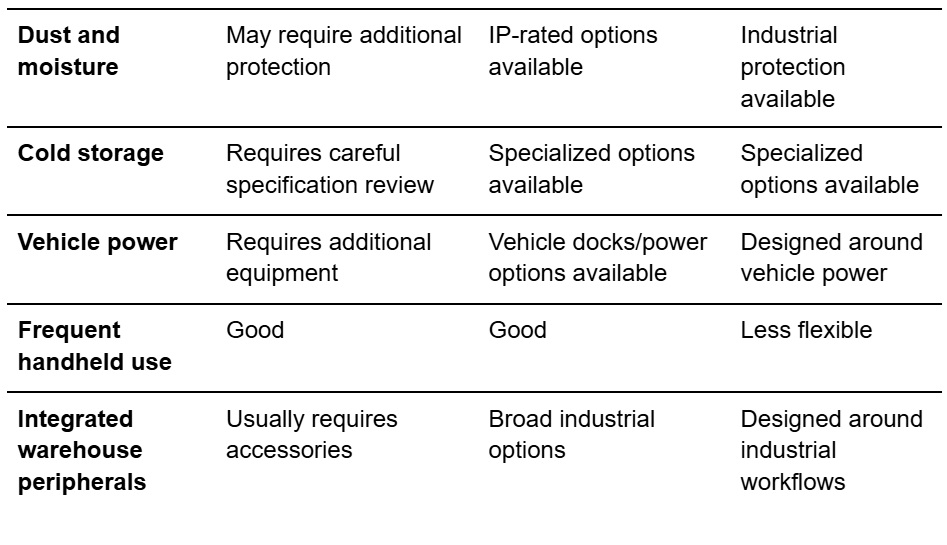
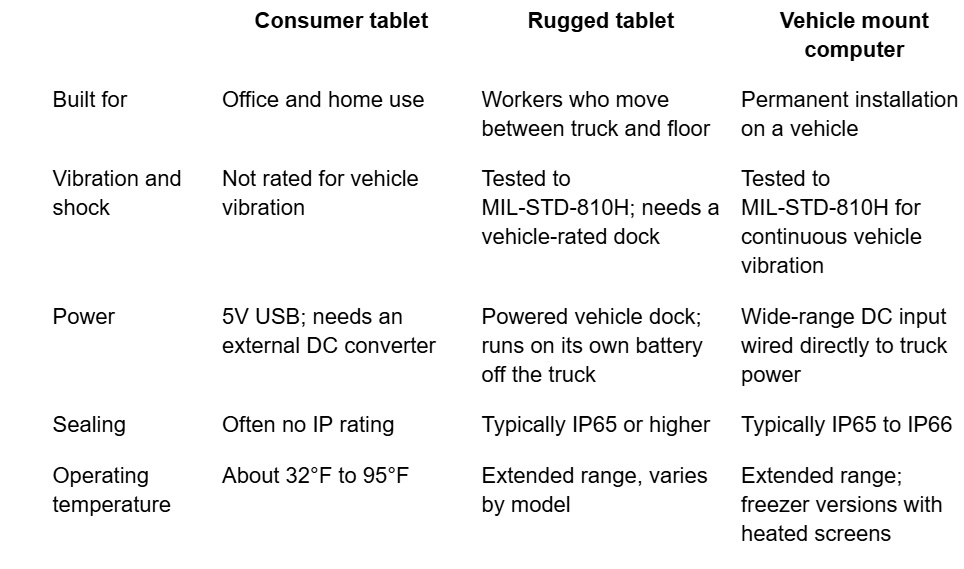
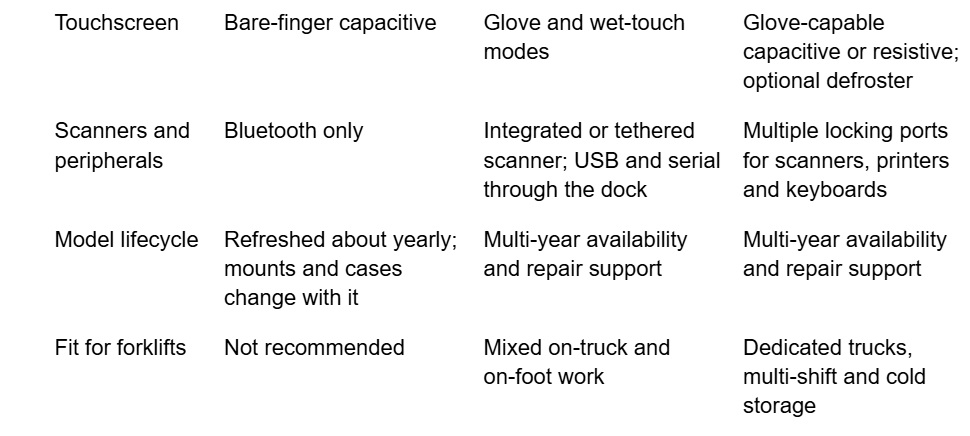
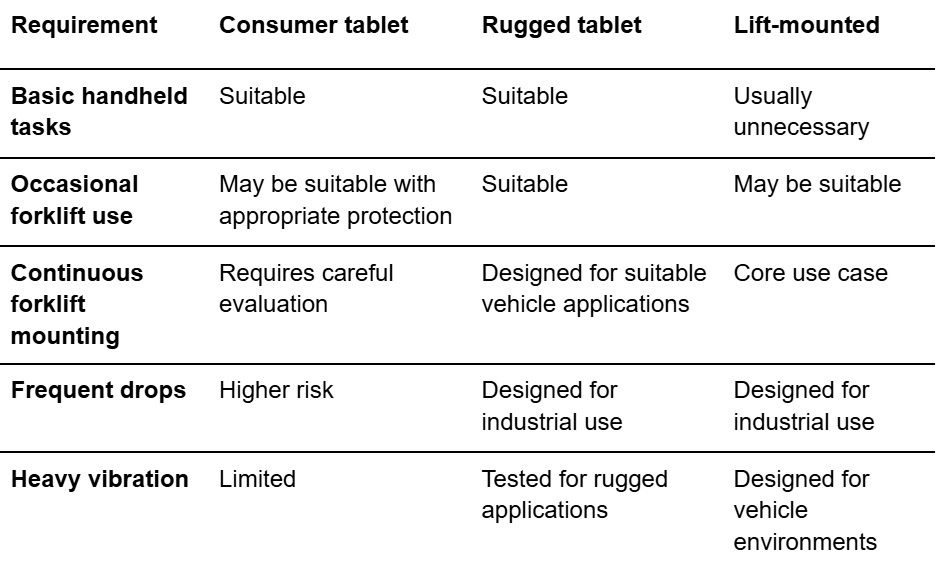
Consumer tablet vs. rugged tablet vs. forklift-mounted computer

The right choice depends on how the device will actually be used.
conditions table 1 of 2

conditions table 2 of 2

This table does not mean that every consumer tablet will fail or every rugged tablet will succeed. Device specifications and the actual operating environment determine suitability.

When are rugged tablets the better fit?

Rugged tablets are generally worth considering when warehouse employees need a device that can move between different work environments while tolerating drops, vibration, dust, moisture, or temperature changes.

They are particularly useful when one device needs to support both forklift and handheld workflows.

Features to evaluate include:

  • Drop testing
  • Vibration testing
  • IP rating
  • Operating-temperature range
  • Screen protection
  • Battery life and hot-swappable batteries
  • Vehicle docks
  • Barcode scanning
  • Glove-compatible touchscreens
  • Available mounting accessories

For example, Honeywell’s rugged tablet portfolio includes models designed for warehouse workers and forklift operators, with vehicle docks and integrated data-capture capabilities. 

When is a forklift-mounted computer the better fit?

A forklift-mounted computer makes more sense when the computer is intended to remain on the vehicle and function as part of the forklift workstation.

Purpose-built vehicle-mounted systems can integrate:

  • Rugged displays
  • Vehicle mounting
  • Power management
  • Industrial keyboards
  • Barcode scanners
  • Wireless connectivity
  • Vehicle docks
  • Peripheral connections

This reduces the need to adapt a consumer device to an environment it was not designed to handle.

The distinction is straightforward:

Rugged tablets prioritize mobility. Forklift-mounted computers prioritize vehicle integration.

Warehouse operators should choose based on workflow rather than simply comparing screen size or purchase price.

Why the lowest upfront cost may not be the lowest total cost

A consumer tablet can cost less to purchase than industrial hardware. But hardware price is only one component of the overall deployment cost.

A warehouse should also consider:

  • Device replacement
  • Repair labor
  • Mount replacement
  • IT support
  • Downtime
  • Lost productivity
  • Accessory replacement
  • Deployment and configuration
  • Battery replacement
  • Device management

Honeywell has argued that consumer-grade mobile devices can generate higher support costs in enterprise deployments, while rugged devices are designed around durability and enterprise use. 

The relevant calculation is therefore total cost of ownership (TCO), not simply the purchase price of the tablet.

How to reduce forklift tablet damage

Choosing the right hardware is only part of the solution.

Warehouse operators can also reduce device failures by establishing basic deployment standards.

Match the hardware to the environment

Before selecting a device, document:

  • Expected vibration and shock
  • Indoor or outdoor use
  • Temperature range
  • Cold-storage exposure
  • Dust and moisture
  • Expected drop frequency
  • Whether the device stays mounted
  • Required barcode and RFID peripherals
  • Required wireless connectivity

Use a forklift-specific mounting system

Select the mount for the forklift, floor conditions, device, and intended workflow.

Do not assume that a generic vehicle mount provides adequate protection against forklift vibration.

Even rugged tablets can experience excessive shock when mounting hardware is not appropriate for the operating conditions. 

Protect power and connections

Secure and route power cables so they are protected from damage and do not interfere with forklift operation.

Consider the dock, power converter, connectors, and cables as part of the computing solution.

Train operators on device handling

Operators should know:

  • Device replacement
  • Repair labor
  • Mount replacement
  • IT support
  • Downtime
  • Lost productivity
  • Accessory replacement
  • Deployment and configuration
  • Battery replacement
  • Device management
  • Safely remove and replace the device
  • Use the dock correctly
  • Avoid placing the device where it can be crushed or struck
  • Report damaged mounts or cables
  • Keep connectors clean
  • Follow charging and battery procedures

Good workplace device protection combines durable hardware with appropriate procedures.

What should warehouse operators look for?

Before purchasing a forklift tablet or computer, ask these questions:

  1. Will the device remain mounted or be carried by operators?
  2. What level of vibration will the device experience?
  3. Will it be exposed to drops or impacts?
  4. What are the minimum and maximum operating temperatures?
  5. Will the device operate in a freezer?
  6. What IP rating is appropriate for the environment?
  7. How will the device receive power from the forklift?
  8. Is the mounting system designed for the specific vehicle?
  9. Which barcode, RFID, keyboard, or other peripherals are required?
  10. What is the expected total cost over the device’s service life?

These questions provide a more useful framework than asking whether a particular tablet is simply “rugged.”

A note on forklift safety

Forklift environments also involve significant worker-safety risks. The National Safety Council reports that forklifts, order pickers, and powered platform trucks were associated with 84 work-related deaths in 2024 and 25,110 DART cases in 2023–2024. Those statistics describe occupational injuries and fatalities; they do not measure tablet damage.

For that reason, tablet mounting and placement should never interfere with an operator’s visibility, controls, safe access, or other established forklift-safety requirements.

The bottom line

Consumer tablets can work in some warehouse applications, but forklifts create conditions that are considerably more demanding than ordinary consumer use.

Forklift operator tablet damage typically comes from a combination of vibration, shock, drops, environmental exposure, vehicle power, mounting, and operator handling.

For occasional or controlled use, a consumer tablet with appropriate protection may be sufficient.

For demanding warehouse environments, rugged tablets offer a purpose-built option when mobility matters. For systems that remain on the lift throughout the workday, forklift-mounted computers provide a more integrated approach.

The best approach is to match the device to the workflow and environment—not simply select the lowest-cost tablet.

That means evaluating industrial tablet durability, mounting, power, environmental protection, operator handling, and total cost of ownership together.

When you consider those factors before deployment, warehouse operators can reduce avoidable equipment damage, minimize device downtime, and build a more reliable mobile computing environment.

Explore our lineup of rugged tablets, handhelds, laptops, scanners, and mounted terminals. Glacier also offers Intrinsically Safe and AI-ready devices, as well as Managed Services. Ask us about how Glacier solutions can help your business thrive in almost any environment.
.
Follow us on LinkedIn or Facebook.

Connectivity for Almost Everything that Moves

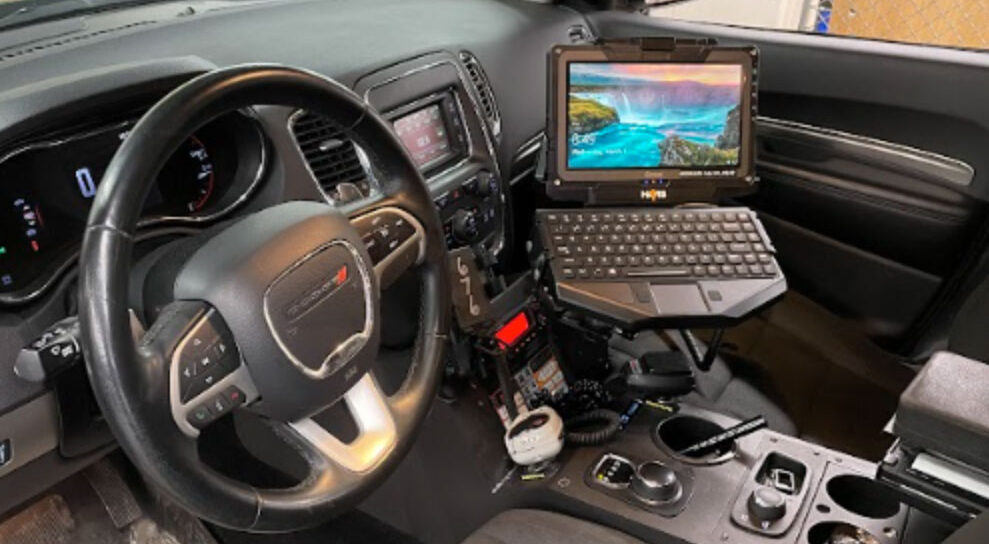
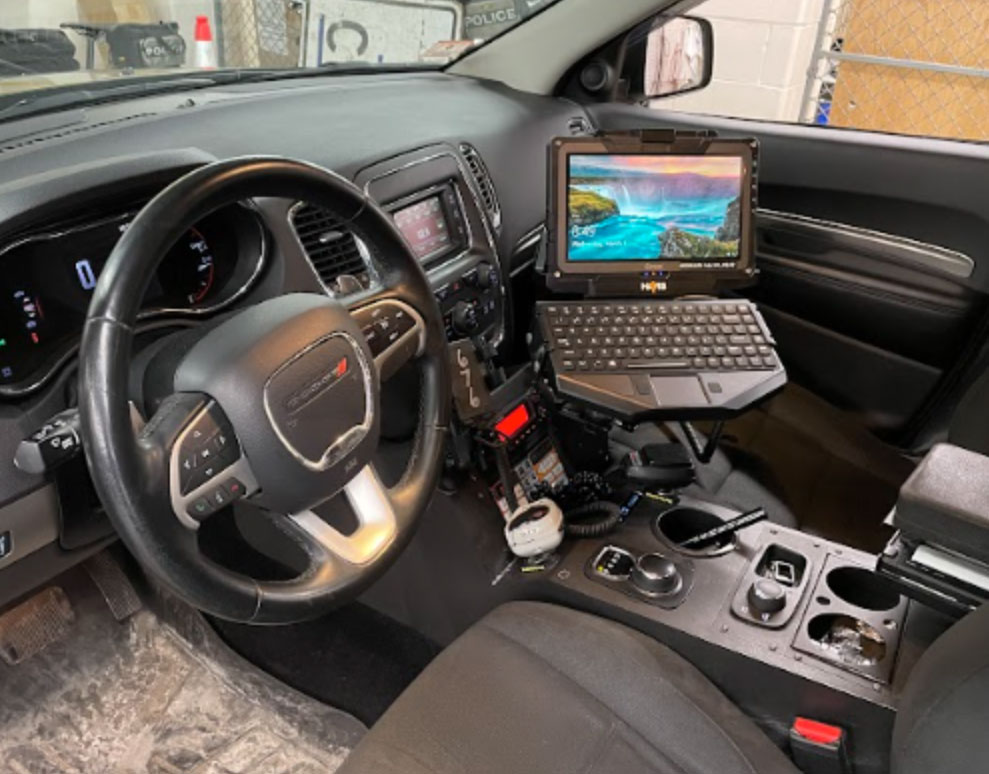
Ruggest tbalet docked with keybaord in a vehicle

If it’s got wheels or moves and you want or need a computer on it or in it, Glacier Computer can get you there from here. We offer one of the most comprehensive lineups of vehicle-mounted computers anywhere. Devices specifically designed to stay connected, even in the most challenging environments.

From a boat on a lake to a ship at sea, inside an ambulance parked in the Arizona desert, or a police car in the frigid cold of an Alaskan lumber trail.  Choose from a short list of top-quality Vehicle-Mounted terminals to an array of devices that you can leave onboard or remove and take with you, which now includes some tablets, handhelds, or laptops.

Contact an Expert to Learn More!

Rugged Matters and So Does Experience

Regardless of what you call ‘The Office,’ your data collection and communications tools need to deliver, and so does Glacier Computer. Our expertise in rugged, fixed, mobile, and vehicle-mounted tech spans a quarter of a century and encompasses nearly every business or industry sector.

Our experts are ready to help you choose the data collection, communication, or connectivity solution that suits your needs and budget. From the one-vehicle mom-and-pop to international conglomerates, Glacier Computer does it all. Contact our solutions experts today.

Looking for something else? We’ve got intrinsically safe devices, rugged printers, scanners, smartphones, tablets, handheld devices, laptops, and partners who can help you make them all work better together.

Talk to an expert!

Dynamic Warehousing for a Dynamic Supply Chain

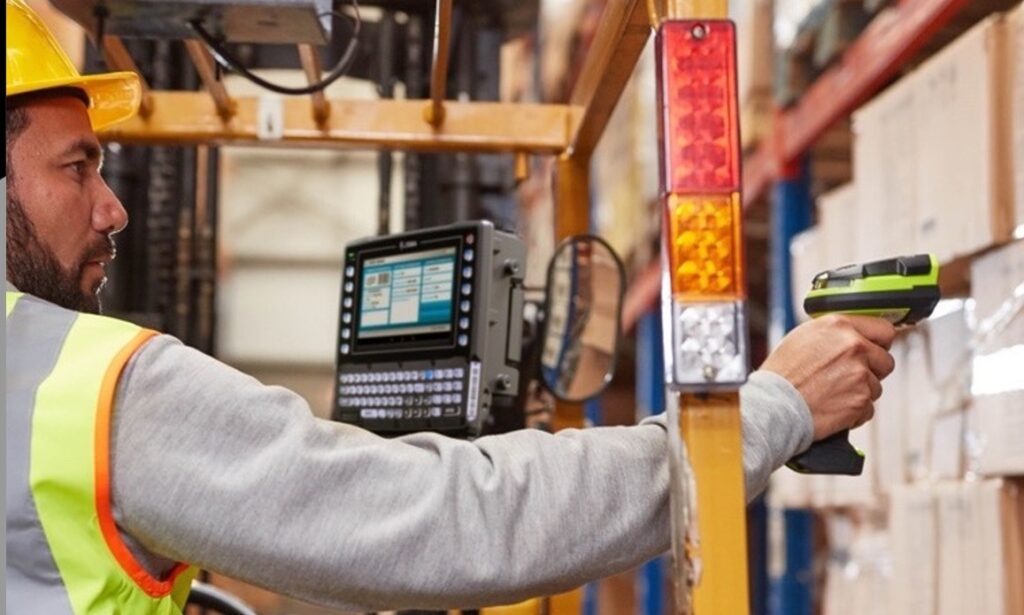
warehouse worker on a forklift

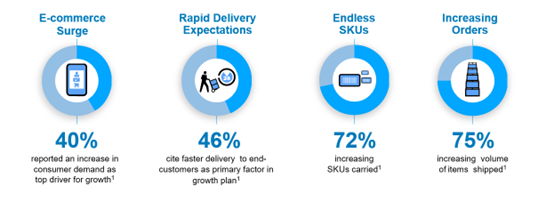
In an era of unprecedented supply chain disruptions, building resilience is critical. Data collection technology is at the forefront of this transformation.

Supply chain statistics

By leveraging real-time data and predictive analytics, businesses can create agile, responsive supply chains that evolve warehouses from static storage hubs into intelligent, adaptive systems.

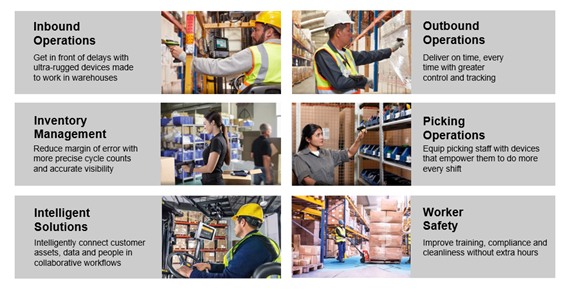
Warehouse efficiency improvement

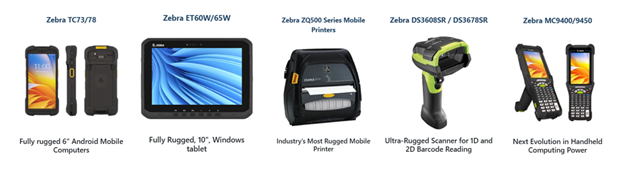
To get there from here, wherever your ‘Here’ happens to be, you can count on Glacier to help identify the right next step on your warehouse modernization journey. We offer the best names in the business, like Zebra tablets, handhelds, mobile printers, and scanners.

Zebra tablets and scanners

And with a quarter-century of experience, you can trust Glacier Computer to recommend the ideal combination of technology and tools tailored to your specific workflows and environments.

  • Get faster, error-free inbound operations. Reduce handling time while increasing throughput and accuracy.
  • Ship correct, complete orders every time. Satisfy and safeguard your customers’ business with equipment that helps their workers pack and stage with exactness.
  • Make inventory visible. Reduce margin or error with more precise cycle counts and accurate inventory visibility.
  • Modernize picking operations with wearable solutions. Utilizing user-friendly, modern technology allows workers to do their best with solutions designed to help them achieve more.
  • Empower warehouse workers to continuously drive performance with intelligent solutions. Keep everything and everyone connected in real time.
  • Protect workers and operational compliance as needs evolve. Keep workers safe, prevent shutdowns, and support compliance with software and solutions.


Dynamic warehousing, driven by the right data collection technology, is crucial for resilient supply chains. Glacier Computer’s 25 years of experience can help build a warehouse that is a strategic asset, responding to disruptions, optimizing resources, and satisfying evolving demands in an unpredictable world.

Talk to an Expert

Improving Warehouse Management Systems: A Path to Operational Efficiency

An effective Warehouse Management System (WMS) is essential for operational success in the fast-paced logistics and supply chain industry. Warehouses face various challenges—such as inventory inaccuracies, space constraints, picking errors, and shipping delays—that can negatively impact profitability and customer satisfaction. Optimizing a WMS is not just about adopting new technology; it’s about improving processes, empowering employees, and aligning tools with business objectives.

How to Improve Your Warehouse Management System for Maximum Efficiency

Here’s how to transform your warehouse into a streamlined, efficient hub capable of meeting the demands of today’s logistics landscape:

1. Embrace Advanced WMS Technology

The backbone of any modern WMS lies in its technology. Outdated systems, which rely on manual data entry or spreadsheets, are prone to errors and often struggle to meet real-time demands. Upgrading to a cloud-based WMS and the latest data collection technology Improves scalability, remote access, and seamless integration with RFID, barcode scanners, and IoT sensors. These technologies enable real-time inventory tracking, minimize discrepancies, and improve data-driven decision-making.

For instance, RFID technology can reduce inventory counting time by up to 90%, while automation technologies, such as robotic picking arms, can significantly boost order fulfillment speed in high-volume warehouses. Choosing a WMS system tailored to your warehouse’s size and throughput ensures it is both robust and cost-effective.

2. Optimize Inventory Management to Reduce Errors

Inventory mismanagement—whether through overstocking, understocking, or lost items—is a significant issue for many warehouses. A modern WMS can help address these problems through features like demand forecasting, cycle counting, and ABC analysis, which prioritizes high-turnover goods.

Implementing Just-in-Time (JIT) inventory practices minimizes excess stock, freeing up capital and optimizing warehouse space. Pairing this with real-time tracking ensures inventory levels are aligned with actual demand, reducing the risk of stockouts during peak seasons. Regular audits and physical counts ensure accuracy and prevent costly surprises.

3. Streamline Warehouse Layout and Space Utilization

A disorganized or poorly designed warehouse can slow down operations. Improving your WMS includes optimizing the physical layout by utilizing strategies such as wider aisles for forklifts, vertical storage solutions, and logical zoning based on picking frequency.

A good WMS will simulate different layouts and suggest slotting strategies, placing fast-moving items near packing stations. For example, dynamic slotting adjusts storage according to seasonal trends, ensuring efficient space utilization year-round. The goal is to reduce travel time for workers, which studies show can account for up to 50% of picking labor.

4. Improve Communication and Integration with the Supply Chain

An efficient WMS should seamlessly connect the warehouse to the broader supply chain. Integrating your WMS with transportation management software, supplier systems, and e-commerce platforms enables smooth data flow.

Automated alerts about incoming shipments prevent dock congestion, while real-time order updates keep customers informed. Clear internal communication via WMS dashboards or mobile apps ensures teams are aligned, improving operational efficiency and reducing delays.

5. Measure and Adapt with Key Performance Indicators (KPIs)

Continuous improvement requires tracking and measuring performance. A WMS should track key performance indicators (KPIs) like order accuracy, picking speed, and inventory turnover. Regular reviews of these KPIs help identify bottlenecks, such as a spike in damaged goods, and allow for necessary adjustments.

Flexibility is essential; as business needs evolve, your WMS should evolve too. Regularly optimizing your system ensures you can stay ahead of industry trends and adapt to future challenges.

Conclusion: Why Improving Your WMS is Essential for Growth

Investing in the improvement of your Warehouse Management System can significantly enhance efficiency, accuracy, and customer satisfaction. By leveraging advanced technology, refining processes, and empowering your team, warehouses can overcome common challenges and thrive in an increasingly competitive landscape.

The result? Faster order fulfillment, happier customers, and a healthier bottom line.

Glacier Computer can assist with WMS improvements, technology integrations, and process optimizations. Talk to an Expert to learn how we can help streamline your warehouse operations today!

Phone: 603.882.1560
Email: sales@glaciercomputer.com

Dear Glacier Customers …

If you are considering a technology refresh for outdated or inefficient devices, please consider Glacier Computer for your data collection and identification technology solutions.

For over 23 years, many have benefited from our consultive input on the very best rugged computing hardware solutions. Our traditional product offerings will continue to include forklift-mounted terminals, rugged tablets, wearable and barcode scanners, printers, and handheld computers.

Wait, There’s More.

To this, we have added select partners that enable us to offer specific market solutions for asset management, RFID, cold chain, Hazardous environments, mobile applications for SAP, video capture, Mobile Data Terminals, and purpose-built custom product development. These solutions will provide a measurable improvement in productivity and labor efficiency.


Why Glacier:

  • Over 23 years of experience and expertise in the automated data collection and mobility space
  • Manufacturer of our own 6th generation forklift terminals and reseller of major OEM rugged tablets
  • One stop for all your rugged computing hardware needs
  • Flexibility in display size, OS, WiFi, cellular, bar code scanning, RFID and other input
  • Guidance on various mounting options for vehicles in the logistics and transportation sectors, including – warehouse forklifts, pallet jacks, yard trucks, and other vehicle types
  • Work closely and are part of the total solutions provided by ISVs and systems integrators
  • Ability to provide evaluation units from our demo pool to test your applications and use cases


If you are looking to upgrade current technology or explore what new solutions are available for your business, then contact Glacier Computer at 866-724-6257 x6 or visit our website glaciercomputer.com.


Glacier Computer Featured on the “The New Warehouse Podcast”

Glacier Computer co-Founder and Strategic Accounts Manager, John Geary made an appearance on The New Warehouse Podcast. The program looks at warehouse logistics and every aspect of the inventory and distribution business.


In this episode, we learn about the different options for rugged computing in the warehouse and also what features should be considered when looking to purchase rugged computing products for your operation. With many options in the marketplace, it is important to make the right decision instead of one that will end up costing you more down the road.


Glacier’s nearly 20-year commitment to rugged data collection gives John the perspective needed to craft effective solutions at the intersection of two fast-moving and expanding environments; computing technology and logistics.


John discusses his history in the computing space and how we have gotten to the rugged portability that we see in our industry today. We also discuss the move in the industry from (the) Windows operating system to Android.


You can listen to the podcast here.

Email John.
603-882-1560 x3213

Glacier Computer Home

Find Glacier on Facebook – Twitter – LinkedIn


We Give Forklift Computing a Lift

Forklift-eblast-image-top-5ac4cb8c29c27For almost 20 years, Glacier Computer has been the industry leader in Forklift Computing.

Thanks to our knowledgeable staff our brand has become synonymous with high-quality products and fast, competent service.

To continue this tradition, Glacier Computer is expanding its products and services to keep your business ahead of the curve with the best data mobility solution for your “rugged” environment.

No matter what the environment.

forklif-graphic-3-5ac4e35661e58

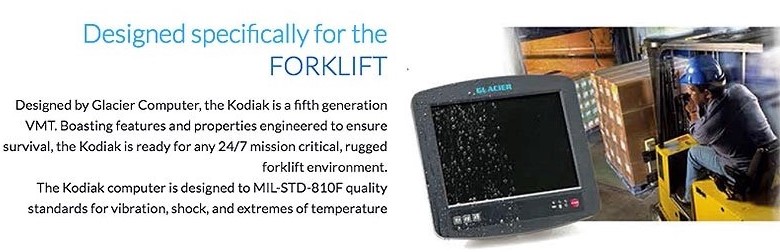
Glacier Computer, founded in 2000, is shipping our 5th generation forklift computer, the Kodiak.

With over 30,000 VMT’s shipped since our inception, we are well versed in the challenges and opportunities of forklift computing.

Call or email us to request a demo today, or visit Glacier Computer.com

We’re at Modex 2018 April 9th – 12th in Atlanta. Visit us at Booth B2122 and say Hello!

Find Glacier on Facebook – Twitter – LinkedIn – YouTube – Google+

Time to Team Up With Glacier

We are reaching out to you today, as a respected and successful value-added reseller in our industry, to introduce, (or reintroduce) you to partnering with Glacier Computer.  Especially during the Madness of upsets that only comes in March, we too look to upset a few #1 positions in your Forklift Computer offering.

As a value-added reseller/systems integrator, we are mindful of the spirit of pride that you take in offering customers the very best selection of products and services.  Customers trust that you have done your homework and offer them the best solutions that meet their unique requirements.

Glacier and the Kodiak offer several key advantages over the “big guys”:

  • No company has more manufacturing experience in full-screen forklift computers
  • Our Kodiak cost to you is significantly less than what you are currently paying
  • Lead time is as quick as three days from time of order
  • We will return every sales and service call faster than our competitors

Kodiak Built for the ForkliftCOST EXAMPLE:  Kodiak-10” display, PCAP touch, 8GB DRAM, 128GB SSD, Fast Roaming WiFi, Multiple secure I/O, Internal 12-48 VDC Conversion, Internal UPS…..$2,599

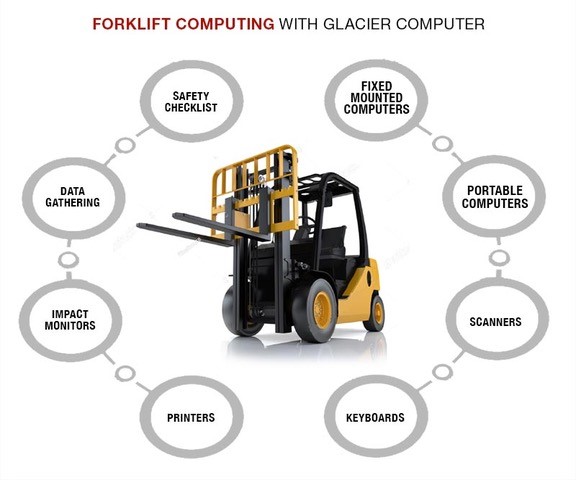
Not only is this a compelling argument against other fixed mounted VMT’s, it challenges the possibilities of using a rugged tablet as a VMT, notwithstanding the need for portability.  In addition, Glacier has everything else your customer needs for an entire forklift computing solution:  keyboard, scanner, mounting hardware, printer, impact monitor, safety checklist, custom warranty programs, US depot repair, and special financing.

Glacier Computer, founded in 2000, is now shipping our 5th generation forklift computer, the Kodiak.  With over 30,000 VMT’s shipped since our inception, we are well versed in the challenges and opportunities of forklift computing. Call us now to learn more, get signed up as a reseller or receive a demo for testing.  We look forward to working with you on your next opportunity.

Stop by our booth at Modex, B2122 and say hello.

Find Glacier on Facebook – Twitter – LinkedIn – YouTube – Google+

10 Questions to Ask When Choosing a Forklift Computer

forklift - Mounting the right computer on a forklift doesn’t need to be a daunting task.

Yes, there are myriad options from rugged all-in-one vehicle-mount units to a wide array of industrial tablet computers.

Yes, making the right selection for your environment and application will play a significant role in user-acceptance, deployment success, and ultimately the ROI management expects from a capital purchase of this size.

And while there is no one-size-fits-all “remedy” you can find the best solution for your operation if you know what questions to ask.

Glacier has deployed more than 30,000 rugged computers over the past 17 years in every sort of operating environment and we’ve compiled a list of the most common questions to ask before you invest in devices for your fleet of fork trucks, carts, or hostlers.

Continue reading

Glacier End of Life Announcement for E4500 and E5000 Everest Computers

Glacier Computer is committed to helping customers maintain their competitive advantage by developing rugged mobile data collection solutions that provide operational efficiency and superior value.

Product End of Life (EOL) and technology evolution are key components of that strategy and Glacier’s Everest E5000, and E4500 rugged terminals have reached a point in their life cycle where components are not as readily available.

We are initiating a notice of last time purchase until July 31, 2017. After that date, there is no guaranty of consistent product availability. We will continue to accommodate repair requests and existing warranties for these products for as long as parts are available while working with customers to develop a roadmap for product migration.

The most direct replacement for the Everest is Glacier’s all new, 6th generation, vehicle-mount terminal, the Kodiak.

The most direct replacement for the Everest is Glacier’s all new, 6th generation, vehicle-mount terminal, the Kodiak. The Kodiak has many of the same features that allowed the Everest to remain a competitive product along with several new attributes that excel over its competition.

Glacier Computer offers a dynamic range of computing solutions to help every customer transition to next-generation technology including rugged tablets and laptops.

Please call 866.724.6257 or contact sales or support with questions, or visit us at Glacier Computer.com.

 GlacierComputer.com – Contact Us – Request a Demo – Email