
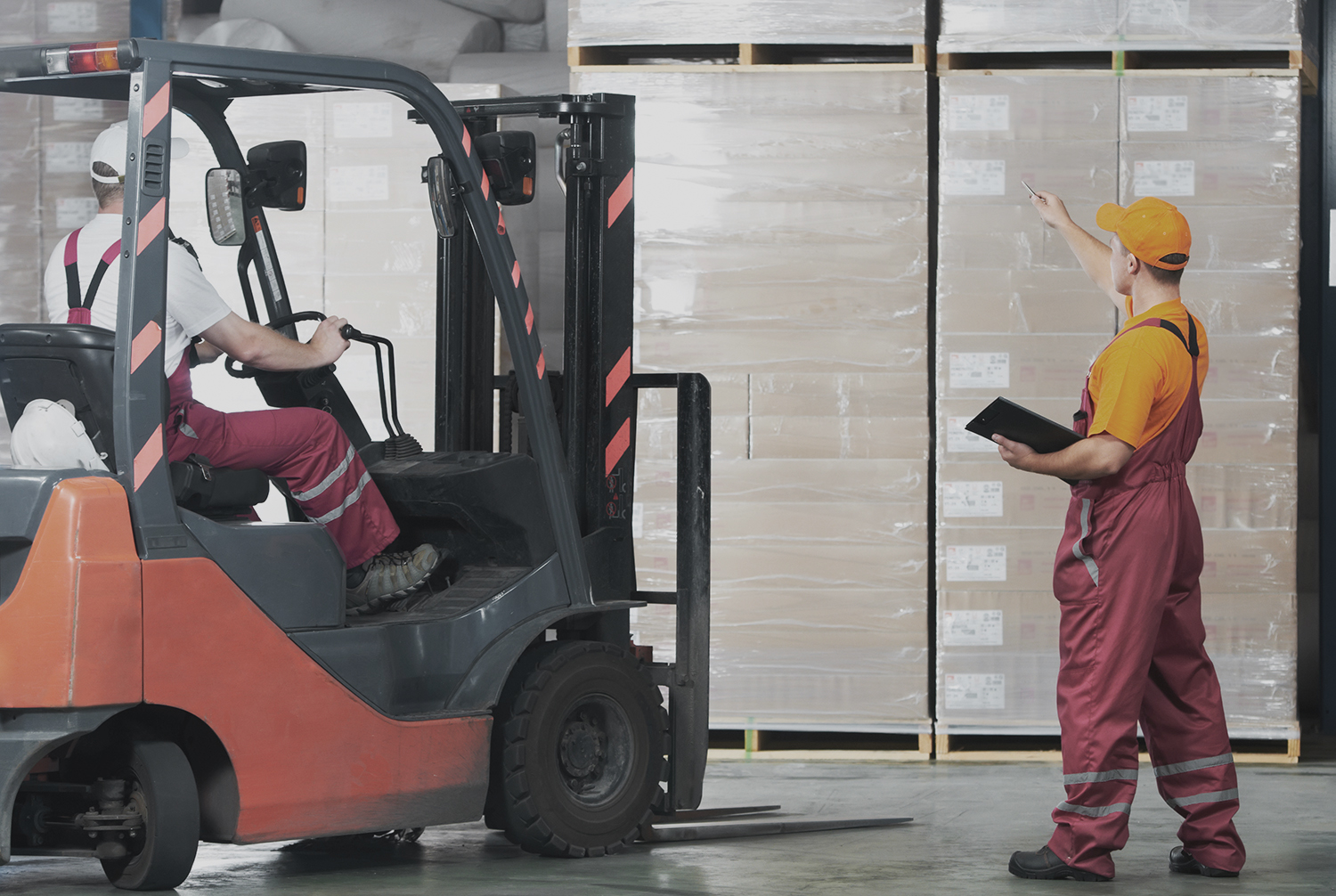
Consumer tablets are affordable, familiar, and easy to deploy. That makes them tempting for warehouse operations that need a screen for inventory management, barcode scanning, warehouse management systems (WMS), or other forklift workflows.
But a tablet designed for everyday consumer use is not necessarily built for life on a forklift.
Forklift tablet damage can come from a combination of vibration, shock, drops, environmental exposure, vehicle power requirements, and repeated operator handling- conditions that can turn a low-cost tablet into a recurring maintenance problem.
For warehouse and logistics operators, the key question is not whether a consumer tablet can be mounted to a forklift. It is whether the device, mounting system, power connection, and accessories are designed for the conditions in which they will operate.
What damages tablets on forklifts?
The most common causes are:
- Continuous forklift vibration
- Shock from uneven warehouse floors
- Accidental drops and impacts
- Poor or incompatible mounting hardware
- Vehicle power fluctuations and connection problems
- Dust, moisture, and temperature extremes
- Frequent removal and handling by operators
- Inadequate protection around ports, connectors, and displays
Each of these conditions can affect device reliability. Together, they can make a consumer tablet a poor fit for continuous forklift use.
1. Forklift vibration is harder on tablets than normal handheld use
A consumer tablet is generally designed to be carried in a person’s hands, placed on a desk, or transported in a bag.
A forklift-mounted tablet experiences something very different: repeated mechanical vibration while the vehicle is moving.
Warehouse floors can include cracks, joints, ramps, uneven surfaces, and other conditions that transmit vibration through the forklift and into its mounting system.
Even rugged hardware has limits. Honeywell’s documentation for its RT10 rugged tablet specifically warns that forklifts with hard wheels or uneven, cracked flooring can create extreme vibration and shock that may result in device or dock failure. The company also notes that inadequate mounting can contribute to damage, interrupted electrical connections, and port failures.
This illustrates an important point about industrial tablet durability:
Rugged hardware alone is not enough. The mounting system must also suit the vehicle and operating environment.
2. Shock and impacts can damage consumer hardware
Forklifts experience sudden shocks that ordinary consumer electronics may rarely encounter.
A device can be jolted when a forklift travels over an uneven surface, encounters a floor joint, or stops suddenly. A tablet can also be struck or dropped when an operator removes it from its mount.
The result can include:
- Cracked screens
- Damaged housings
- Loose internal connections
- Damaged charging or USB ports
- Broken mounts or docks
- Intermittent connectivity
- Complete device failure
Rugged devices address these risks through reinforced construction and testing. For example, Honeywell describes its rugged warehouse tablets as being tested against drop and vibration requirements and designed for harsh industrial environments.
3. The mounting system matters as much as the tablet
One of the easiest mistakes is to think of a forklift computer as simply a tablet plus a bracket.
In reality, a forklift-mounted computing system can include:
- Tablet or vehicle-mounted computer
- Vehicle dock
- Mounting arm
- Shock isolation
- Power converter
- Power cable
- Keyboard
- Barcode scanner
- Wireless connectivity
- Peripheral connections
Every connection affects the system’s reliability.
A poorly selected mount can transfer excessive vibration to the tablet. A damaged cable can interrupt power or communications. A loose dock can allow movement that increases shock and mechanical stress.
For this reason, warehouse operators considering forklift-mounted computers should evaluate the complete system, not just the tablet specifications.
4. Consumer tablets are not necessarily designed for forklift power
Power is another major difference between consumer and industrial deployments.
A consumer tablet normally expects power from a standard charger or USB-based power source. A forklift, however, has a vehicle electrical system that must be converted and managed appropriately for this equipment.
A forklift deployment may therefore require:
- Vehicle-compatible power conversion
- Properly protected cables
- A suitable tablet dock
- Secure electrical connections
- Power management appropriate to the vehicle
Without the right infrastructure, an otherwise functional tablet can experience interruptions or connection problems.
Purpose-built vehicle computers and industrial tablet docks are designed with these requirements in mind.
5. Cold storage can expose another weakness
Freezer and refrigerated warehouses place additional demands on computing hardware.
Low temperatures can affect batteries, displays, electronics, and other components. Moving equipment between cold and warmer environments can also introduce condensation.
That is why cold-storage deployments should be evaluated based on the device’s specified operating temperature, rather than assuming a tablet will work just because it can power on in a cold environment.
Some rugged tablets are specifically designed for warehouse and cold-storage applications. Honeywell, for example, describes rugged tablet models intended for extreme hot and cold storage environments, with features such as rugged construction and vehicle docking.
6. Dust and moisture are part of warehouse equipment damage
Warehouses vary considerably in environmental conditions.
A device used inside a clean distribution center may face very different conditions from one used near loading docks, manufacturing areas, outdoor yards, or dusty storage environments.
Dust and moisture can affect:
- Charging ports
- Connectors
- Speakers
- Buttons
- Docks
- Internal electronics
Rugged tablets commonly address these conditions with sealed enclosures and IP-rated protection.
For example, Honeywell’s RT10W documentation specifies IP65 protection against dust and water and a 4-foot drop specification under MIL-STD-810G testing.
The exact rating matters, however. Evaluate IP ratings, drop specifications, temperature ratings, and vibration testing against the actual warehouse environment rather than treating them as interchangeable features.
7. Operator handling is a major part of tablet durability
A forklift tablet may spend part of its life mounted to the vehicle and part of its life in an operator’s hands.
Operators may need to:
- Remove the device from its dock
- Carry it around the warehouse
- Scan barcodes
- Enter data
- Work while wearing gloves
- Reconnect the tablet to its dock
- Attach peripherals
- Move between forklifts or work areas
Repeated handling creates opportunities for drops, impacts, cable damage, and connector wear.
This is where operator handling becomes an important consideration in device selection.
If the workflow requires frequent movement between a forklift and the warehouse floor, a rugged tablet can provide more flexibility than a permanently mounted computer.
If the device stays on the forklift throughout the shift, a purpose-built forklift-mounted computer may be a better fit.
Consumer tablet vs. rugged tablet vs. forklift-mounted computer
The right choice depends on how the device will actually be used.
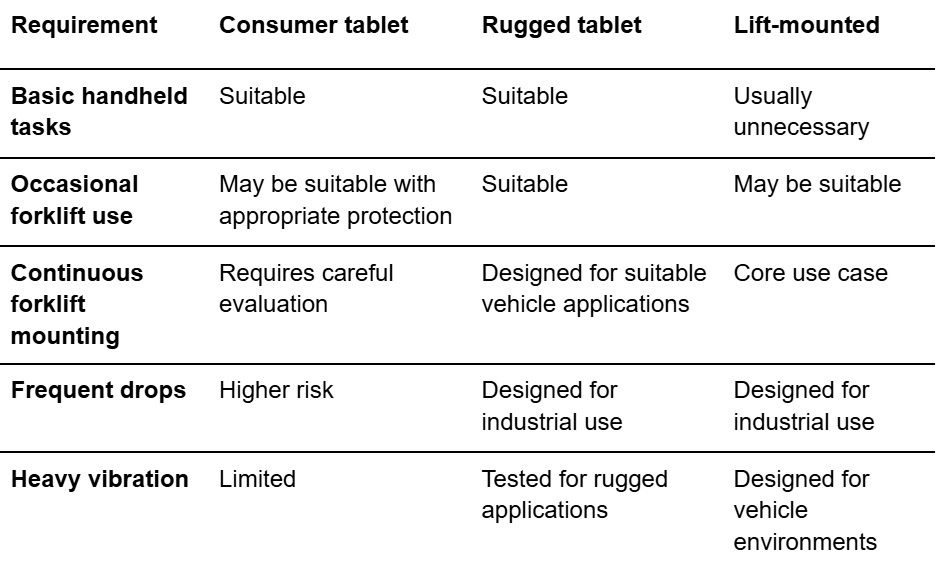
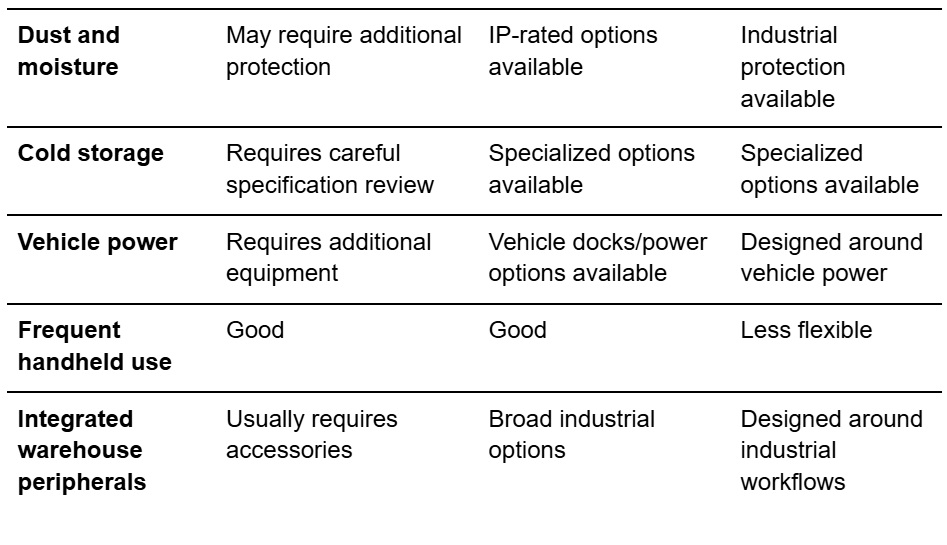
This table does not mean that every consumer tablet will fail or every rugged tablet will succeed. Device specifications and the actual operating environment determine suitability.
When are rugged tablets the better fit?
Rugged tablets are generally worth considering when warehouse employees need a device that can move between different work environments while tolerating drops, vibration, dust, moisture, or temperature changes.
They are particularly useful when one device needs to support both forklift and handheld workflows.
Features to evaluate include:
- Drop testing
- Vibration testing
- IP rating
- Operating-temperature range
- Screen protection
- Battery life and hot-swappable batteries
- Vehicle docks
- Barcode scanning
- Glove-compatible touchscreens
- Available mounting accessories
For example, Honeywell’s rugged tablet portfolio includes models designed for warehouse workers and forklift operators, with vehicle docks and integrated data-capture capabilities.
When is a forklift-mounted computer the better fit?
A forklift-mounted computer makes more sense when the computer is intended to remain on the vehicle and function as part of the forklift workstation.
Purpose-built vehicle-mounted systems can integrate:
- Rugged displays
- Vehicle mounting
- Power management
- Industrial keyboards
- Barcode scanners
- Wireless connectivity
- Vehicle docks
- Peripheral connections
This reduces the need to adapt a consumer device to an environment it was not designed to handle.
The distinction is straightforward:
Rugged tablets prioritize mobility. Forklift-mounted computers prioritize vehicle integration.
Warehouse operators should choose based on workflow rather than simply comparing screen size or purchase price.
Why the lowest upfront cost may not be the lowest total cost
A consumer tablet can cost less to purchase than industrial hardware. But hardware price is only one component of the overall deployment cost.
A warehouse should also consider:
- Device replacement
- Repair labor
- Mount replacement
- IT support
- Downtime
- Lost productivity
- Accessory replacement
- Deployment and configuration
- Battery replacement
- Device management
Honeywell has argued that consumer-grade mobile devices can generate higher support costs in enterprise deployments, while rugged devices are designed around durability and enterprise use.
The relevant calculation is therefore total cost of ownership (TCO), not simply the purchase price of the tablet.
How to reduce forklift tablet damage
Choosing the right hardware is only part of the solution.
Warehouse operators can also reduce device failures by establishing basic deployment standards.
Match the hardware to the environment
Before selecting a device, document:
- Expected vibration and shock
- Indoor or outdoor use
- Temperature range
- Cold-storage exposure
- Dust and moisture
- Expected drop frequency
- Whether the device stays mounted
- Required barcode and RFID peripherals
- Required wireless connectivity
Use a forklift-specific mounting system
Select the mount for the forklift, floor conditions, device, and intended workflow.
Do not assume that a generic vehicle mount provides adequate protection against forklift vibration.
Even rugged tablets can experience excessive shock when mounting hardware is not appropriate for the operating conditions.
Protect power and connections
Secure and route power cables so they are protected from damage and do not interfere with forklift operation.
Consider the dock, power converter, connectors, and cables as part of the computing solution.
Train operators on device handling
Operators should know:
- Device replacement
- Repair labor
- Mount replacement
- IT support
- Downtime
- Lost productivity
- Accessory replacement
- Deployment and configuration
- Battery replacement
- Device management
- Safely remove and replace the device
- Use the dock correctly
- Avoid placing the device where it can be crushed or struck
- Report damaged mounts or cables
- Keep connectors clean
- Follow charging and battery procedures
Good workplace device protection combines durable hardware with appropriate procedures.
What should warehouse operators look for?
Before purchasing a forklift tablet or computer, ask these questions:
- Will the device remain mounted or be carried by operators?
- What level of vibration will the device experience?
- Will it be exposed to drops or impacts?
- What are the minimum and maximum operating temperatures?
- Will the device operate in a freezer?
- What IP rating is appropriate for the environment?
- How will the device receive power from the forklift?
- Is the mounting system designed for the specific vehicle?
- Which barcode, RFID, keyboard, or other peripherals are required?
- What is the expected total cost over the device’s service life?
These questions provide a more useful framework than asking whether a particular tablet is simply “rugged.”
A note on forklift safety
Forklift environments also involve significant worker-safety risks. The National Safety Council reports that forklifts, order pickers, and powered platform trucks were associated with 84 work-related deaths in 2024 and 25,110 DART cases in 2023–2024. Those statistics describe occupational injuries and fatalities; they do not measure tablet damage.
For that reason, tablet mounting and placement should never interfere with an operator’s visibility, controls, safe access, or other established forklift-safety requirements.
The bottom line
Consumer tablets can work in some warehouse applications, but forklifts create conditions that are considerably more demanding than ordinary consumer use.
Forklift operator tablet damage typically comes from a combination of vibration, shock, drops, environmental exposure, vehicle power, mounting, and operator handling.
For occasional or controlled use, a consumer tablet with appropriate protection may be sufficient.
For demanding warehouse environments, rugged tablets offer a purpose-built option when mobility matters. For systems that remain on the lift throughout the workday, forklift-mounted computers provide a more integrated approach.
The best approach is to match the device to the workflow and environment—not simply select the lowest-cost tablet.
That means evaluating industrial tablet durability, mounting, power, environmental protection, operator handling, and total cost of ownership together.
When you consider those factors before deployment, warehouse operators can reduce avoidable equipment damage, minimize device downtime, and build a more reliable mobile computing environment.