

Standard tablets fail in warehouses for predictable reasons: drops onto concrete, dust from packaging and forklift traffic, condensation when devices move between freezers and ambient docks, and dead batteries mid-shift. Choosing the right rugged tablet isn’t about picking the toughest device on paper — it’s about matching durability ratings, data-capture hardware, mounting, and battery architecture to how your floor actually runs.
This guide breaks down the buying criteria that matter, compares the main device categories, and gives clear picks for four common warehouse scenarios: cold storage, forklift mounting, barcode-driven picking, and continuous 24/7 operation.
The buying criteria that actually predict uptime
Most spec sheets bury the four things that determine whether a device survives your environment. Evaluate these first.
- Ingress protection (IP rating). Look for IP65 at minimum for general warehouse floors, and IP66 or IP67 where washdown, heavy dust, or moisture is present. The first digit is dust; the second is water. A sealed, fanless design matters more than the headline number — fans pull in particulate and are the most common early failure point.
- Drop and vibration resistance (MIL-STD-810H). MIL-STD-810H is the baseline certification for industrial hardware. What matters underneath it: the tested drop height (4–6 ft onto concrete is the useful range for picking and forklift use) and whether the device is rated for sustained vibration if it will be vehicle-mounted.
- Operating temperature range. This is the criterion cold-storage buyers most often get wrong. A device rated to 32°F is useless in a freezer. Look for a stated operating range that covers your coldest zone (often down to -4°F / -20°C or lower) plus explicit thermal-shock and anti-condensation handling for freezer-to-dock transitions.
- Battery architecture. For single-shift use, an all-day battery is enough. For 24/7 or multi-shift operations, hot-swappable batteries are non-negotiable — they let an operator swap a depleted cell without shutting down the OS or dropping off the network. Check whether the device holds a bridge charge during the swap.
Secondary but important: integrated (vs. bolt-on) barcode scanning, glove-capable capacitive touch, screen brightness for outdoor docks, WMS and MDM compatibility, and mount ecosystem.
Device categories compared
There are three practical form factors for warehouse work. Each fits a different operating pattern.
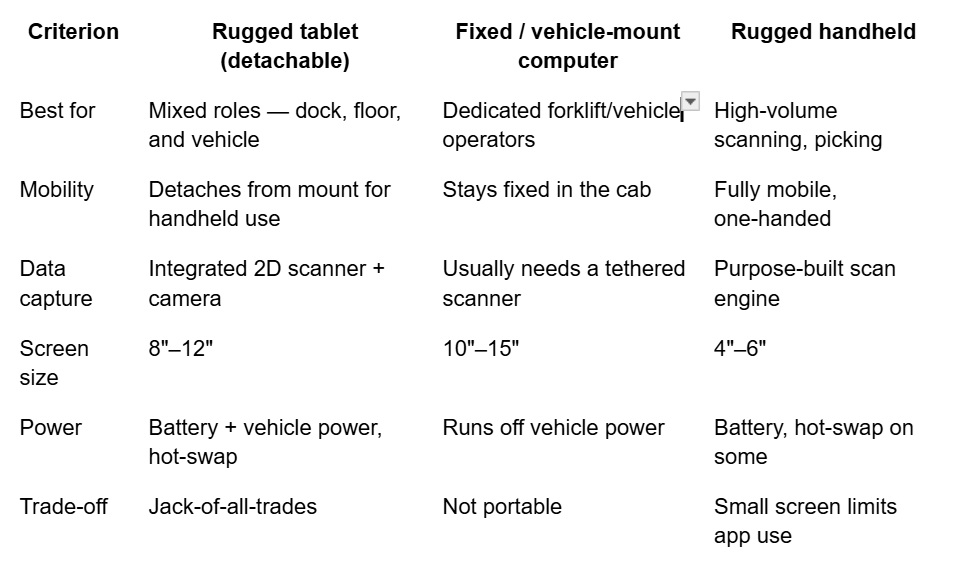
The detachable rugged tablet has become the default for most operations because it covers the widest range of roles at a lower total cost of ownership than buying separate fixed and handheld fleets. Dedicated forklift operations and pure scan-and-pick roles are the two cases where a specialized device still wins.
Picks by warehouse scenario
Cold storage and freezer operations
Prioritize operating temperature range and condensation handling above everything else. The device needs a stated low-temperature rating that covers your coldest zone, anti-fog or heated display glass, and glove-capable touch (workers won’t remove insulated gloves to tap a screen). Hot-swap batteries matter here too — cold drains cells faster than spec-sheet numbers suggest.
What to ask a vendor: What is the exact operating temperature range, and is there thermal-shock testing for freezer-to-dock transitions? Glacier offers Getac’s F110 and F120 rugged tablets, rated to Operate from -29°C to 63°C / -20°F to 145°F at – 95% RH, non-condensing.
Forklift and vehicle mounting
Prioritize a vibration-rated device, an active powered dock (not just a cradle), and a screen large enough to read at arm’s length in a moving vehicle. The best setup is a vibration-damped dock wired to the vehicle’s power supply, so the tablet stays charged and secured but can still be pulled for handheld tasks. Confirm the mount connects via powered pogo pins rather than a loose charging cable.
What to ask a vendor: Is the device MIL-STD-810H vibration-tested, and does the dock deliver power through the mount? Glacier offers the MobileDemand T1175 xTablet, with a non-powered forklift dock or a powered dock and a kit to support 11-60V direct-wire options.
Barcode scanning and order picking
Prioritize an integrated 2D scan engine over a Bluetooth add-on — paired peripherals fail, need charging, and slow pickers down. Look for a dedicated scan trigger (physical button), fast decode on damaged or low-contrast labels, and long-range options if you scan high racking. RFID and NFC are worth it if your WMS uses them.
What to ask a vendor: Is the scanner an embedded engine with a hardware trigger, and what’s the read range? Zebra’s ET6X Series offers an optional SE55 1D/2D Advanced Range Scan Engine with IntelliFocus™ technology, which lets you scan from 2.2 inches (5.6 cm) to over 40 feet (12.2 meters).
24/7 and multi-shift operations
Prioritize hot-swappable batteries and MDM support. Continuous operation lives or dies on battery swaps that don’t interrupt the OS, plus centralized device management so IT can push updates and monitor battery health across the fleet without touching each unit. Confirm compatibility with your MDM platform (SOTI, VMware, Microsoft Intune, etc.).
What to ask a vendor: Does the device hold a bridge charge during hot-swap, and which MDM platforms are supported? Get the Durabook R8 rugged tablet with a hot-swappable option and either a Li-Ion 7.6V, 3600mAh battery with 8.5 hours of life or a 7.6V, 7200mAh battery with 17 hours of life.
Total cost of ownership: why rugged wins over consumer devices
Consumer tablets look cheaper until you count the full lifecycle. A purpose-built rugged tablet typically carries a higher upfront cost but a lower TCO over a 3–5 year deployment because of three things: dramatically lower failure and replacement rates, an integrated scanner that eliminates separate peripheral purchases and pairing overhead, and centralized MDM that cuts per-device IT time. In high-throughput environments, a single hour of downtime from a failed device often costs more than the price difference itself.
Frequently asked questions
What IP rating do I need for a warehouse tablet? IP65 is the practical minimum for a general warehouse floor, protecting against dust and low-pressure water jets. Choose IP66 or IP67 where there’s washdown, heavy dust, or moisture exposure. Prioritize a sealed, fanless design, since cooling fans are a common early failure point in dusty environments.
What temperature rating do I need for a cold storage tablet? Match the device’s stated operating range to your coldest zone — many freezers require a rating down to -4°F (-20°C) or lower. Beyond the number, confirm the device handles thermal shock and condensation when moving between freezers and ambient docks, and that it has anti-fog display glass and glove-capable touch.
Do hot-swappable batteries really prevent downtime? Yes, for 24/7 and multi-shift operations. A hot-swap system keeps the processor and memory powered by a small bridge battery for a few minutes, so an operator can replace the main battery without shutting down or losing the network connection. This eliminates reboot time on every swap, which adds up across a large fleet.
Should I choose a rugged tablet or a fixed vehicle-mount computer for forklifts? A detachable rugged tablet on a powered, vibration-damped dock is the more flexible choice for most operations, because it stays mounted and charged during forklift use but can be removed for handheld tasks. A dedicated fixed vehicle-mount computer still makes sense when the operator never leaves the cab, and you want a larger permanent display.
Is an integrated barcode scanner worth it over a Bluetooth scanner? For high-volume picking, yes. An embedded scan engine with a hardware trigger is faster and more reliable than a paired Bluetooth device, and it removes the cost, charging, and pairing failures of a separate peripheral. This is a major reason purpose-built rugged tablets have a lower total cost of ownership over their lifecycle.
Get a fit assessment for your warehouse
Every warehouse floor runs differently. If you tell us your operating temperatures, mounting needs, WMS, and shift pattern, we’ll spec the right configuration rather than sell you more device than you need.
Request a rugged tablet fit assessment → https://glaciercomputer.com/contactus/