Warehouse productivity depends on accurate inventory information, reliable equipment, and keeping materials moving.
But what happens when the computers operators depend on aren’t designed for their environment?
Forklifts operate across loading docks, warehouse aisles, refrigerated storage areas, and high-traffic distribution centers. These environments expose computers to vibration, dust, temperature changes, and constant use.
Standard consumer tablets aren’t always equipped to handle those conditions.
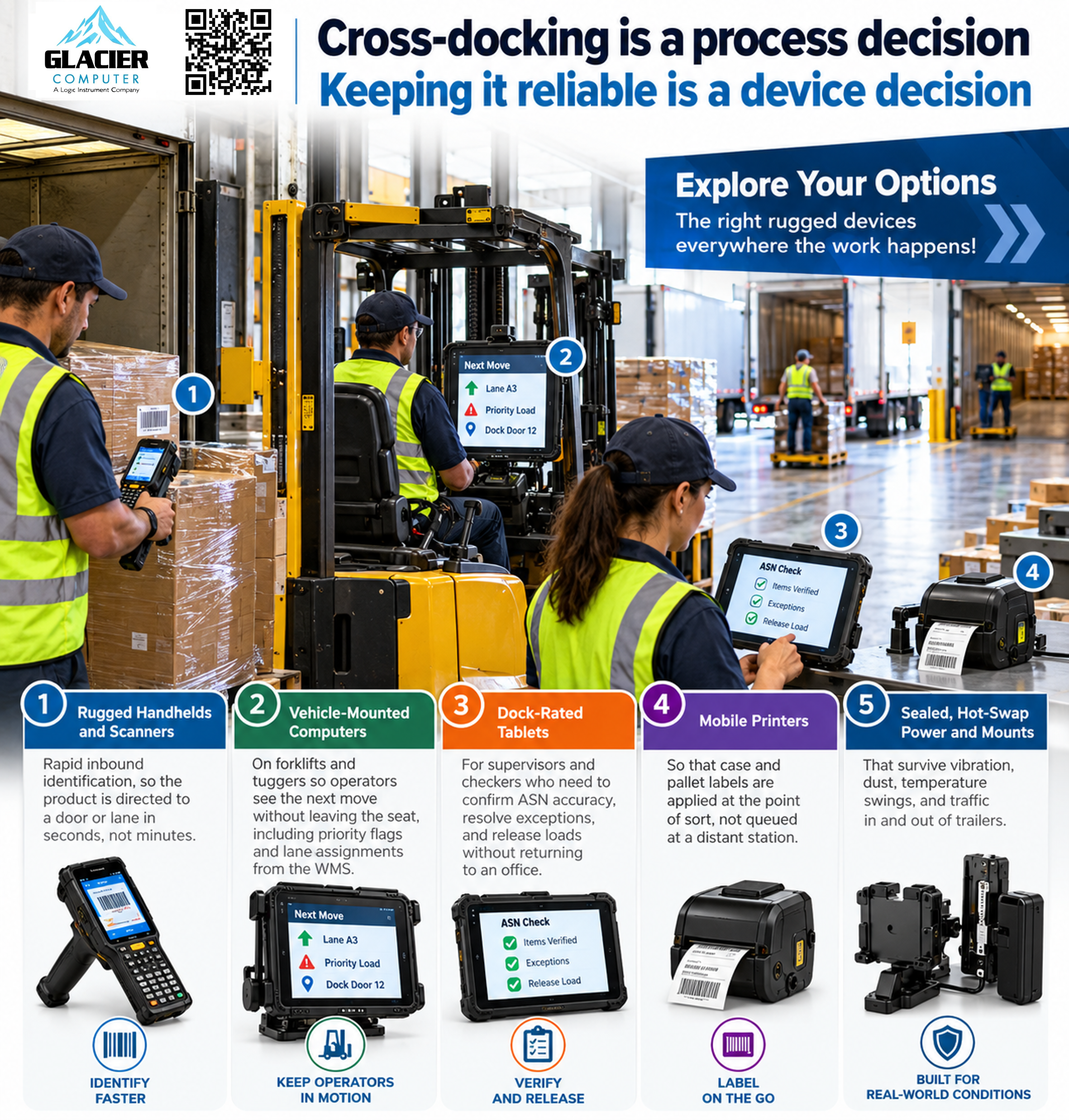
Rugged warehouse tablets and forklift vehicle-mount computers provide a more dependable computing solution for barcode scanning workflows, inventory management, and continuous material handling operations.
For warehouse and logistics operators, choosing the right equipment isn’t simply about durability. It’s about keeping inventory accurate, operators productive, and warehouse systems accessible throughout every shift.
What Are Forklift Vehicle Mount Computers?
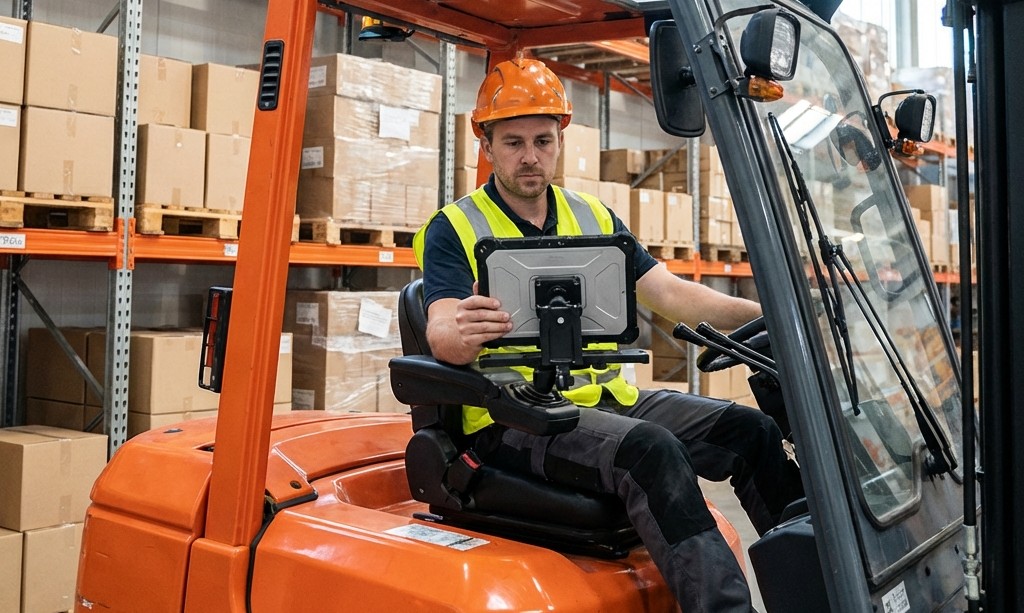
Forklift vehicle-mount computers are industrial computing devices designed to operate while securely mounted to forklifts and other material-handling equipment.
Unlike standard tablets, purpose-built vehicle-mount computers are engineered for environments where vibration, dust, temperature fluctuations, and continuous operation can affect performance.
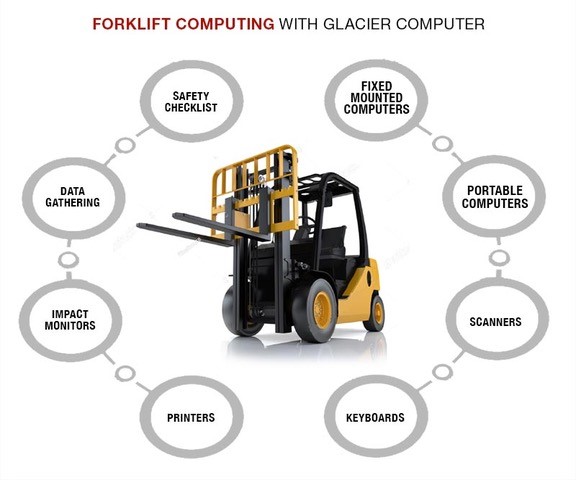
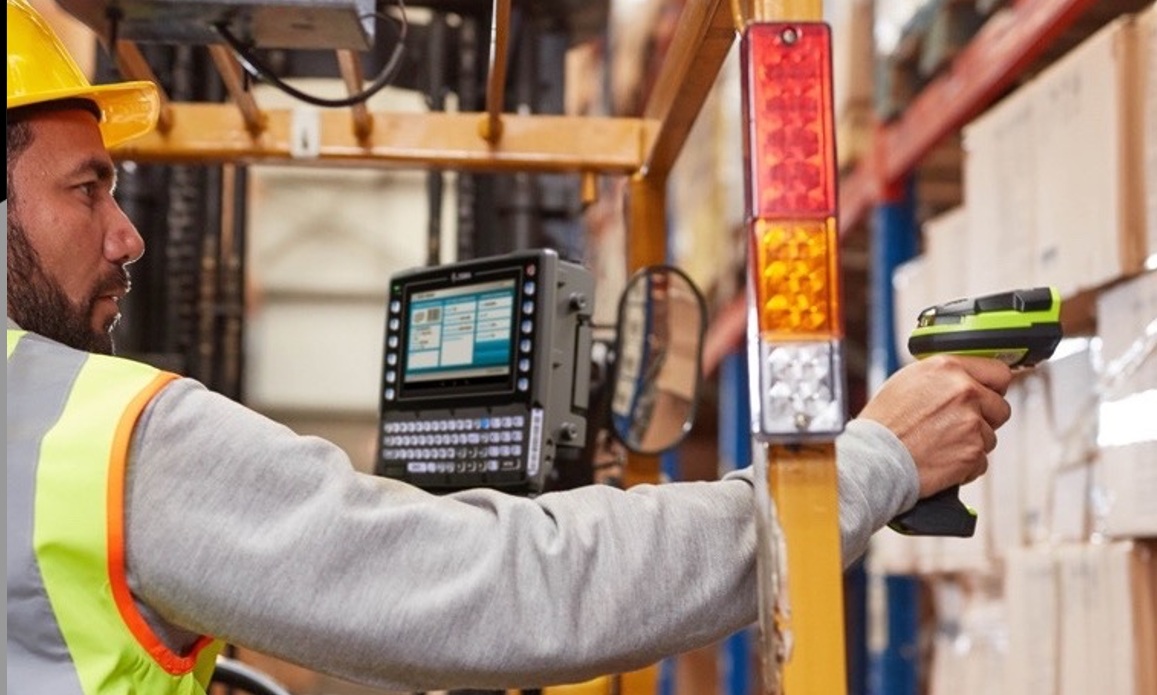
They typically connect to warehouse management systems (WMS) and compatible barcode scanners, letting forklift operators access and update inventory information directly from their vehicles.
Common applications include:
- Barcode scanning: Capturing pallet, product, and location information.
- Inventory management: Updating stock movements and storage locations.
- Order fulfillment: Accessing picking instructions and confirming completed tasks.
- Receiving and putaway: Verifying incoming inventory and assigned storage locations.
- Cold storage operations: Supporting workflows in refrigerated and freezer environments.
- Material handling: Providing operators with access to warehouse applications without repeatedly returning to a workstation.
For facilities managing high inventory volumes, these capabilities help connect physical material movement with digital inventory records.
Why Do Standard Tablets Struggle in Warehouse Environments?
Standard consumer tablets are primarily designed for everyday indoor use, not the physical demands of industrial warehouse operations.
Although they may work in controlled environments, several common warehouse conditions can increase their risk of failure.
1. Constant Vibration and Movement
Forklifts travel over concrete floors, loading dock transitions, and uneven surfaces throughout the day.
Repeated vibration can stress devices, connectors, and mounting systems not designed for vehicle operation.
2. Dust and Airborne Particles
Warehouses frequently contain packaging debris, dust, and other airborne particles.
Devices without suitable ingress protection are more vulnerable to contamination, especially around ports and openings.
3. Temperature Fluctuations
A tablet that performs well in a climate-controlled office may not operate reliably inside a refrigerated warehouse or freezer.
Cold temperatures can affect battery performance, displays, and other components.
4. Accidental Impacts
Even securely mounted devices can sustain impacts during installation, maintenance, or daily operations.
Industrial-grade equipment can provide additional protection against these conditions.
5. Unplanned Downtime
When a device fails, the consequences go beyond replacing the hardware.
Operators may lose access to picking instructions, inventory records, or barcode scanning applications.
The real cost of an unreliable warehouse computer is the disruption it creates across material handling workflows.
How Do Rugged Warehouse Tablets Reduce Downtime?
Rugged warehouse tablets reduce hardware-related downtime by incorporating features built for demanding operating environments.
Depending on the device, these may include reinforced construction, environmental sealing, industrial-grade connectors, and support for vehicle-mounted power.
These features can help warehouse operators maintain access to critical applications throughout demanding shifts.
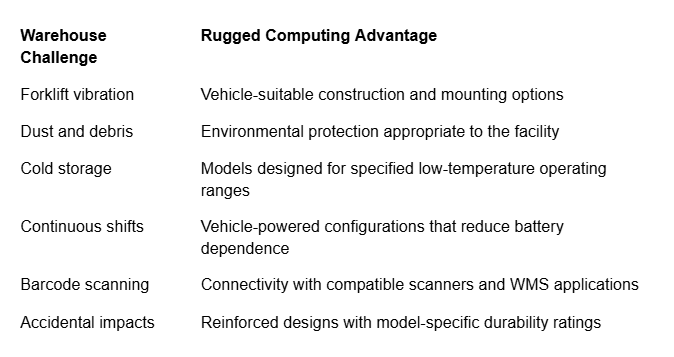
However, rugged construction alone doesn’t guarantee uninterrupted operation.
Reliable performance also depends on proper mounting, stable power, wireless connectivity, compatible peripherals, and a well-configured warehouse management system.
How Do Forklift-Mounted Computers Improve Barcode Scanning Workflows?
Barcode scanning workflows connect physical inventory movement with warehouse management software.
When forklift operators can scan inventory and access instructions directly from their vehicles, they can complete tasks with fewer unnecessary trips to fixed workstations.
Consider a typical pallet putaway workflow.
Step 1: Receive the Task
The forklift operator receives a putaway assignment through the vehicle-mounted computer.
Step 2: Identify the Pallet
Using a connected barcode scanner, the operator scans the pallet or license plate barcode to confirm the inventory.
Step 3: Verify the Destination
The warehouse management system displays the assigned storage location.
Step 4: Move and Confirm
The operator moves the pallet, scans the destination barcode, and confirms the move.
Step 5: Update Inventory Records
The WMS records the transaction, making the updated inventory location available to authorized users.
This workflow reduces manual data entry, improves transaction accuracy, and provides faster inventory visibility.
For logistics and material handling teams, the goal is straightforward: capture accurate information where warehouse work actually happens.
What Makes a Computer Suitable for Cold Storage Warehouses?
Cold storage environments introduce challenges that aren’t always present in conventional distribution facilities.
Low temperatures, condensation, and transitions between refrigerated and ambient environments can affect computing equipment.
When evaluating cold storage tablets or vehicle-mount computers, warehouse operators should consider several factors.
Operating Temperature Range
Verify that the manufacturer’s specified operating range supports the facility’s actual temperatures, including the coldest expected conditions.
Condensation Management
Moving equipment between temperature zones can create condensation. The device and installation should accommodate those transitions.
Display Usability
Screens must remain readable and responsive under the facility’s operating conditions. Glove compatibility may also be important.
Power Configuration
Battery performance can decline in low temperatures. Vehicle-powered computers may be preferable for some continuously operated forklifts.
Barcode Scanner Compatibility
Confirm that connected scanners, cables, and accessories are also rated for the intended environment.
Not every rugged tablet is designed for freezer operation.
Verify cold storage compatibility against the device’s published specifications, rather than assuming it from a rugged designation.
Forklift-Mounted Tablets vs. Vehicle Mount Computers: What’s the Difference?
Both rugged tablets and dedicated vehicle-mount computers can support warehouse operations, but they serve different operational requirements.
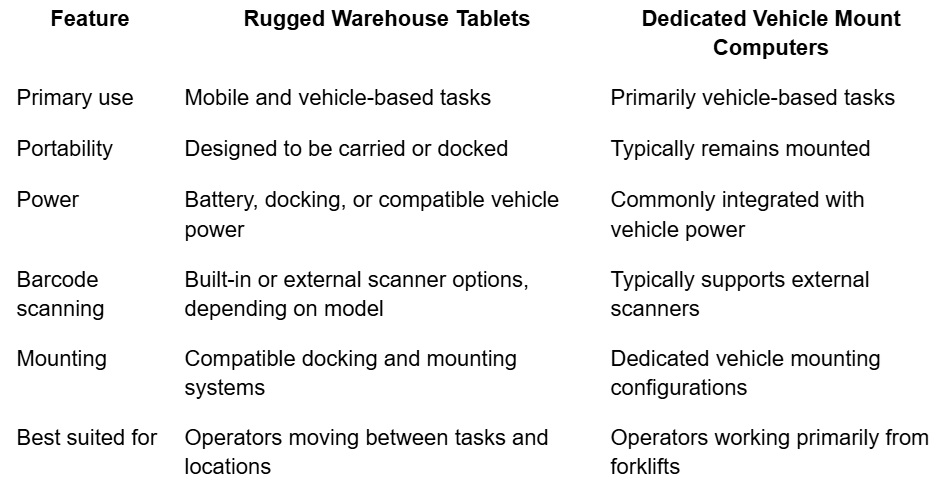
Neither option is universally better.
A warehouse employee who frequently leaves the forklift may benefit from a removable rugged tablet.
An operator who spends most of the shift on a forklift may benefit from a dedicated vehicle-mount computer with a fixed display and a vehicle power connection.
The right choice depends on how employees work, not simply which device has the longest list of specifications.
Rugged Computing Solutions for Different Forklift Workflows
Not every warehouse needs the same type of rugged computer.
A forklift operating in a conventional distribution center may have different requirements from one working inside a freezer. Likewise, an operator using a Windows-based warehouse application may need a different configuration from a team running Android applications.
Glacier Computer offers rugged computing solutions designed to address these different operational requirements.
RuggON Vulcan: Vehicle-Mounted Computing for Demanding Environments
The RuggOn Vulcan 10A and 10X are rugged forklift-mounted computers designed for industrial material-handling applications.
The published specifications include:
- An operating temperature range of -30°C to +55°C.(-22°F to 131°F)
- IP66 and MIL-STD-810H rated protection
- Integrated 12–48VDC vehicle power support.
- An internal uninterruptible power supply (UPS).
These capabilities make the Vulcan worth evaluating for facilities where temperature extremes, vehicle power, and continuous access to warehouse applications matter.
For example, a distribution center running multiple forklift shifts may benefit from a vehicle-mounted computer that draws power directly from the forklift rather than relying on routine battery swaps.
The integrated UPS can also help manage brief external power interruptions, subject to its supported operating conditions.
Best suited for: Warehouse and logistics operations requiring dedicated forklift-mounted computing, including qualifying cold storage applications.
Zebra VC8300: Android Computing for Forklift Operations
The Zebra VC8300, available through Glacier Computer, is another option for warehouse operators evaluating rugged vehicle-mounted technology.
This Android-based computer features:
- An 8-inch display.
- IP66-rated environmental sealing.
- A configuration designed for freezer environments.
- Support for vehicle-mounted warehouse applications and compatible peripherals.
For facilities using Android-based warehouse software, the VC8300 provides an alternative to traditional Windows-oriented vehicle computing configurations.
Its compact form factor also helps when forklift cab space and operator visibility are key considerations.
Best suited for: Forklift operations using compatible Android warehouse applications, including facilities requiring a freezer-rated configuration.
Industrial Barcode Scanners: Completing the Workflow
A rugged vehicle-mount computer is only one component of a successful barcode scanning deployment.
The scanner must also be appropriate for the workflow.
For example, a forklift operator scanning pallet labels from a seated position may require different scanning capabilities than an employee scanning individual cartons at close range.
Glacier Computer offers industrial barcode scanning solutions for different scanning distances, interfaces, and operational environments.
When selecting scanners, warehouse operators should evaluate:
- Typical scanning distance.
- Barcode type and label quality.
- Compatibility with the vehicle-mounted computer.
- Environmental exposure.
- Operator ergonomics.
- Integration with existing warehouse applications.
Selecting the computer and scanner as part of a coordinated workflow helps reduce compatibility problems and improves the consistency of inventory data capture.
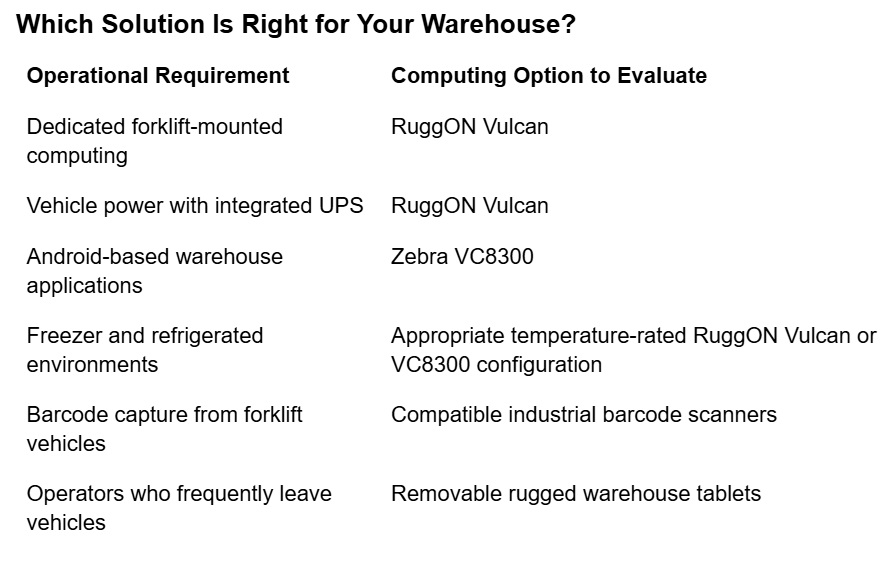
These recommendations are starting points, not universal compatibility guarantees. Base the final selection on the facility’s operating conditions, software, mounting requirements, and verified product specifications.
How to Choose Rugged Tablets for Warehouse Asset Visibility
Warehouse asset visibility depends on capturing accurate information about inventory, equipment, and material movements.
Choosing a computing device requires more than evaluating screen size or processor performance.
Warehouse and logistics operators should answer six questions before selecting equipment:
- Where will the computer operate? Identify temperature ranges, dust exposure, vibration, and other environmental conditions.
- Will operators carry the device or keep it mounted? Match the form factor to actual work patterns.
- Which barcode scanners are required? Verify scanner interfaces, barcode types, and application compatibility.
- How will the computer connect to the WMS? Evaluate operating system compatibility, Wi-Fi coverage, and application requirements.
- How will the device receive power? Consider vehicle power integration, battery requirements, and shift duration.
- How will equipment be maintained? Review mounting access, replacement procedures, support availability, and long-term device management.
For asset visibility projects, reliable data capture is only one part of the solution.
The computer, barcode scanner, wireless network, and warehouse management software must work together to provide dependable inventory information.
Choosing Rugged Computing Solutions for 24/7 Warehouse Operations
Warehouses operating around the clock place additional demands on computing equipment.
Multiple shifts, continuous forklift use, and limited maintenance windows can make equipment reliability especially important.
For these operations, purchasing decisions should consider the full deployment, not just the device.
That includes:
- Power reliability: Appropriate vehicle power supplies and protection against electrical fluctuations.
- Wireless connectivity: Consistent network access across aisles, loading docks, and storage zones.
- Mounting stability: Secure installation that accommodates forklift vibration and supports operator ergonomics.
- Serviceability: Practical procedures for repairs, replacements, and maintenance.
- Software compatibility: Support for the warehouse’s required applications and operating environment.
A rugged device can reduce exposure to common hardware failures, but a reliable 24/7 deployment requires the entire system to be engineered and maintained appropriately.
Glacier Computer: Rugged Computing for Real-World Warehouse Operations
At Glacier Computer, we understand that warehouse technology must support the way operators actually work.
A computer used on a forklift has different requirements from one used at a receiving desk. A device operating in cold storage faces different challenges from equipment used in a conventional distribution center.
These distinctions matter when selecting industrial tablets and vehicle-mounted computers.
Glacier Computer provides rugged computing solutions for demanding industrial applications, including warehouse operations, logistics, and material handling.
From dedicated vehicle-mounted computers like the Vulcan to solutions like the Zebra VC8300, we help organizations evaluate technology suited to their operating environments and application requirements.
Whether a facility is upgrading forklift barcode scanning workflows, evaluating rugged warehouse tablets, or planning a broader warehouse technology deployment, the starting point should always be the same:
Understand the operating environment, identify the workflow requirements, and select technology designed to support both.
For additional guidance, explore our forklift-mounted computers and rugged tablets for warehouse operations.
Frequently Asked Questions
What is the best tablet for forklift barcode scanning?
The best tablet for forklift barcode scanning supports the facility’s WMS, connects to the required barcode scanner, withstands the operating environment, and offers appropriate mounting and power options. A rugged tablet may suit mixed mobile and vehicle-based work, while a dedicated vehicle-mounted computer may suit operators who stay on forklifts.
Can rugged tablets be used in cold storage warehouses?
Yes. Certain rugged tablets and industrial computers are designed for refrigerated or freezer environments. For example, the Vulcan has a published operating range down to -22°F, while the Zebra VC8300 offers a freezer configuration. Operators should verify the specific device’s temperature range and installation requirements before deployment.
How do rugged tablets improve warehouse productivity?
Rugged tablets improve warehouse productivity by providing dependable access to inventory records, work instructions, and barcode-scanning applications at the point of work. This reduces unnecessary travel to fixed workstations and minimizes disruptions caused by unsuitable hardware.
Are vehicle-mounted computers better than handheld tablets?
Vehicle-mounted computers often suit operators who spend most of their shifts on forklifts. Handheld rugged tablets may be more appropriate for employees who move between vehicles, storage locations, and other work areas. The best option depends on the workflow and environment.
Can forklift-mounted computers connect to warehouse management systems?
Yes. Compatible forklift-mounted computers can run or access WMS applications through supported operating systems, wireless networks, and application interfaces. Compatibility should be verified with the specific WMS and deployment configuration.
What should warehouses look for in a computer designed for 24/7 operations?
Warehouses should prioritize environmental suitability, stable power, reliable wireless connectivity, secure mounting, application compatibility, and serviceability. Published durability and operating specifications should be reviewed for each device.
What is the difference between a rugged warehouse tablet and an industrial tablet?
An industrial tablet is generally designed for commercial or industrial applications, while a rugged warehouse tablet emphasizes durability for demanding warehouse environments. These categories can overlap. Buyers should compare specific environmental ratings, mounting options, operating systems, and connectivity rather than relying on product labels alone.
Why is vehicle power important for forklift-mounted computers?
Vehicle power lets compatible forklift-mounted computers run on the forklift’s electrical system, reducing reliance on standalone battery charging. Proper power integration matters because forklift electrical systems can experience voltage fluctuations and interruptions. Devices such as the Vulcan include integrated vehicle power support and an internal UPS.
Keep Warehouse Operations Moving with the Right Technology
Barcode scanning, inventory visibility, and material handling efficiency depend on reliable access to warehouse systems.
When computing equipment isn’t designed for its operating conditions, even routine tasks can be disrupted.
Rugged warehouse tablets and forklift vehicle-mounted computers address these challenges by providing computing options built for demanding industrial environments.
Glacier Computer helps organizations evaluate rugged computing solutions that fit their warehouse workflows, operating conditions, and material handling requirements.
Explore our forklift-mounted computing solutions to identify the right approach for your facility.