
Why Consumer Tablets Break on Forklifts

world class forklift-tablet

Consumer tablets are affordable, familiar, and easy to deploy. That makes them tempting for warehouse operations that need a screen for inventory management, barcode scanning, warehouse management systems (WMS), or other forklift workflows.

But a tablet designed for everyday consumer use is not necessarily built for life on a forklift.

Forklift tablet damage can come from a combination of vibration, shock, drops, environmental exposure, vehicle power requirements, and repeated operator handling- conditions that can turn a low-cost tablet into a recurring maintenance problem.

For warehouse and logistics operators, the key question is not whether a consumer tablet can be mounted to a forklift. It is whether the device, mounting system, power connection, and accessories are designed for the conditions in which they will operate.

What damages tablets on forklifts?

The most common causes are:

  • Continuous forklift vibration
  • Shock from uneven warehouse floors
  • Accidental drops and impacts
  • Poor or incompatible mounting hardware
  • Vehicle power fluctuations and connection problems
  • Dust, moisture, and temperature extremes
  • Frequent removal and handling by operators
  • Inadequate protection around ports, connectors, and displays

Each of these conditions can affect device reliability. Together, they can make a consumer tablet a poor fit for continuous forklift use.

1. Forklift vibration is harder on tablets than normal handheld use

A consumer tablet is generally designed to be carried in a person’s hands, placed on a desk, or transported in a bag.

A forklift-mounted tablet experiences something very different: repeated mechanical vibration while the vehicle is moving.

Warehouse floors can include cracks, joints, ramps, uneven surfaces, and other conditions that transmit vibration through the forklift and into its mounting system.

Even rugged hardware has limits. Honeywell’s documentation for its RT10 rugged tablet specifically warns that forklifts with hard wheels or uneven, cracked flooring can create extreme vibration and shock that may result in device or dock failure. The company also notes that inadequate mounting can contribute to damage, interrupted electrical connections, and port failures.

This illustrates an important point about industrial tablet durability:

Rugged hardware alone is not enough. The mounting system must also suit the vehicle and operating environment.

2. Shock and impacts can damage consumer hardware

Forklifts experience sudden shocks that ordinary consumer electronics may rarely encounter.

A device can be jolted when a forklift travels over an uneven surface, encounters a floor joint, or stops suddenly. A tablet can also be struck or dropped when an operator removes it from its mount.

The result can include:

  • Cracked screens
  • Damaged housings
  • Loose internal connections
  • Damaged charging or USB ports
  • Broken mounts or docks
  • Intermittent connectivity
  • Complete device failure

Rugged devices address these risks through reinforced construction and testing. For example, Honeywell describes its rugged warehouse tablets as being tested against drop and vibration requirements and designed for harsh industrial environments.

3. The mounting system matters as much as the tablet

One of the easiest mistakes is to think of a forklift computer as simply a tablet plus a bracket.

In reality, a forklift-mounted computing system can include:

  • Tablet or vehicle-mounted computer
  • Vehicle dock
  • Mounting arm
  • Shock isolation
  • Power converter
  • Power cable
  • Keyboard
  • Barcode scanner
  • Wireless connectivity
  • Peripheral connections

Every connection affects the system’s reliability.

A poorly selected mount can transfer excessive vibration to the tablet. A damaged cable can interrupt power or communications. A loose dock can allow movement that increases shock and mechanical stress.

For this reason, warehouse operators considering forklift-mounted computers should evaluate the complete system, not just the tablet specifications.

4. Consumer tablets are not necessarily designed for forklift power

Power is another major difference between consumer and industrial deployments.

A consumer tablet normally expects power from a standard charger or USB-based power source. A forklift, however, has a vehicle electrical system that must be converted and managed appropriately for this equipment.

A forklift deployment may therefore require:

  • Vehicle-compatible power conversion
  • Properly protected cables
  • A suitable tablet dock
  • Secure electrical connections
  • Power management appropriate to the vehicle

Without the right infrastructure, an otherwise functional tablet can experience interruptions or connection problems.

Purpose-built vehicle computers and industrial tablet docks are designed with these requirements in mind.

5. Cold storage can expose another weakness

Freezer and refrigerated warehouses place additional demands on computing hardware.

Low temperatures can affect batteries, displays, electronics, and other components. Moving equipment between cold and warmer environments can also introduce condensation.

That is why cold-storage deployments should be evaluated based on the device’s specified operating temperature, rather than assuming a tablet will work just because it can power on in a cold environment.

Some rugged tablets are specifically designed for warehouse and cold-storage applications. Honeywell, for example, describes rugged tablet models intended for extreme hot and cold storage environments, with features such as rugged construction and vehicle docking.

6. Dust and moisture are part of warehouse equipment damage

Warehouses vary considerably in environmental conditions.

A device used inside a clean distribution center may face very different conditions from one used near loading docks, manufacturing areas, outdoor yards, or dusty storage environments.

Dust and moisture can affect:

  • Charging ports
  • Connectors
  • Speakers
  • Buttons
  • Docks
  • Internal electronics

Rugged tablets commonly address these conditions with sealed enclosures and IP-rated protection.

For example, Honeywell’s RT10W documentation specifies IP65 protection against dust and water and a 4-foot drop specification under MIL-STD-810G testing. 

The exact rating matters, however. Evaluate IP ratings, drop specifications, temperature ratings, and vibration testing against the actual warehouse environment rather than treating them as interchangeable features.

7. Operator handling is a major part of tablet durability

A forklift tablet may spend part of its life mounted to the vehicle and part of its life in an operator’s hands.

Operators may need to:

  • Remove the device from its dock
  • Carry it around the warehouse
  • Scan barcodes
  • Enter data
  • Work while wearing gloves
  • Reconnect the tablet to its dock
  • Attach peripherals
  • Move between forklifts or work areas

Repeated handling creates opportunities for drops, impacts, cable damage, and connector wear.

This is where operator handling becomes an important consideration in device selection.

If the workflow requires frequent movement between a forklift and the warehouse floor, a rugged tablet can provide more flexibility than a permanently mounted computer.

If the device stays on the forklift throughout the shift, a purpose-built forklift-mounted computer may be a better fit.

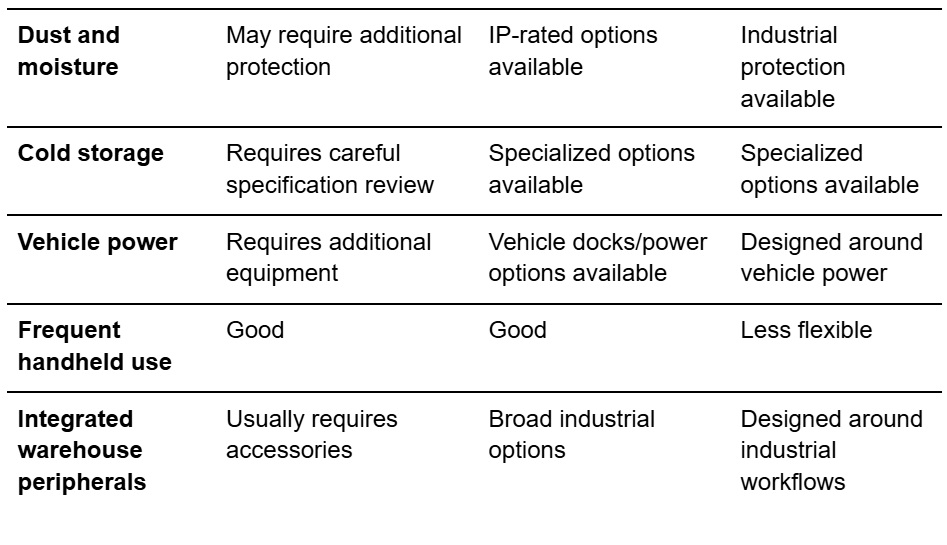
Consumer tablet vs. rugged tablet vs. forklift-mounted computer

The right choice depends on how the device will actually be used.
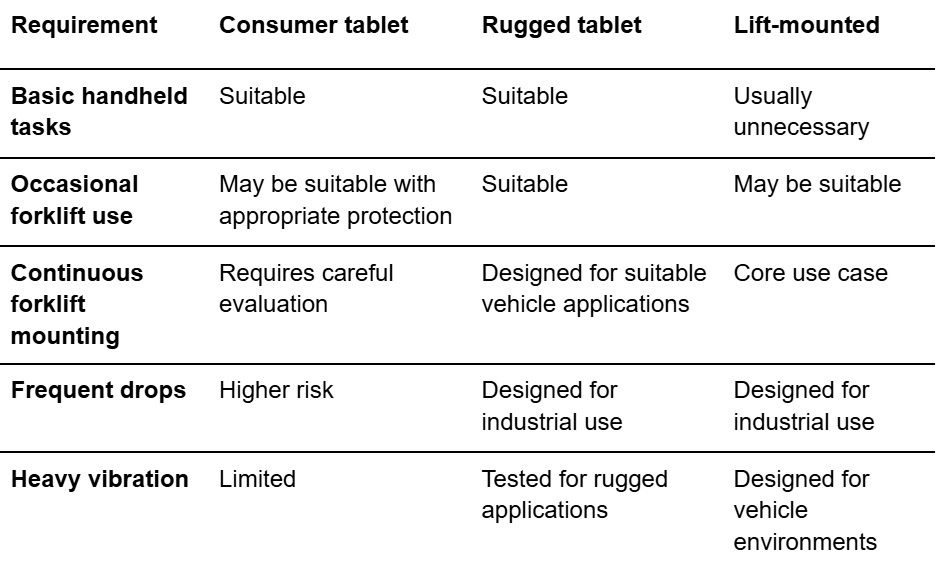
conditions table 1 of 2

conditions table 2 of 2

This table does not mean that every consumer tablet will fail or every rugged tablet will succeed. Device specifications and the actual operating environment determine suitability.

When are rugged tablets the better fit?

Rugged tablets are generally worth considering when warehouse employees need a device that can move between different work environments while tolerating drops, vibration, dust, moisture, or temperature changes.

They are particularly useful when one device needs to support both forklift and handheld workflows.

Features to evaluate include:

  • Drop testing
  • Vibration testing
  • IP rating
  • Operating-temperature range
  • Screen protection
  • Battery life and hot-swappable batteries
  • Vehicle docks
  • Barcode scanning
  • Glove-compatible touchscreens
  • Available mounting accessories

For example, Honeywell’s rugged tablet portfolio includes models designed for warehouse workers and forklift operators, with vehicle docks and integrated data-capture capabilities. 

When is a forklift-mounted computer the better fit?

A forklift-mounted computer makes more sense when the computer is intended to remain on the vehicle and function as part of the forklift workstation.

Purpose-built vehicle-mounted systems can integrate:

  • Rugged displays
  • Vehicle mounting
  • Power management
  • Industrial keyboards
  • Barcode scanners
  • Wireless connectivity
  • Vehicle docks
  • Peripheral connections

This reduces the need to adapt a consumer device to an environment it was not designed to handle.

The distinction is straightforward:

Rugged tablets prioritize mobility. Forklift-mounted computers prioritize vehicle integration.

Warehouse operators should choose based on workflow rather than simply comparing screen size or purchase price.

Why the lowest upfront cost may not be the lowest total cost

A consumer tablet can cost less to purchase than industrial hardware. But hardware price is only one component of the overall deployment cost.

A warehouse should also consider:

  • Device replacement
  • Repair labor
  • Mount replacement
  • IT support
  • Downtime
  • Lost productivity
  • Accessory replacement
  • Deployment and configuration
  • Battery replacement
  • Device management

Honeywell has argued that consumer-grade mobile devices can generate higher support costs in enterprise deployments, while rugged devices are designed around durability and enterprise use. 

The relevant calculation is therefore total cost of ownership (TCO), not simply the purchase price of the tablet.

How to reduce forklift tablet damage

Choosing the right hardware is only part of the solution.

Warehouse operators can also reduce device failures by establishing basic deployment standards.

Match the hardware to the environment

Before selecting a device, document:

  • Expected vibration and shock
  • Indoor or outdoor use
  • Temperature range
  • Cold-storage exposure
  • Dust and moisture
  • Expected drop frequency
  • Whether the device stays mounted
  • Required barcode and RFID peripherals
  • Required wireless connectivity

Use a forklift-specific mounting system

Select the mount for the forklift, floor conditions, device, and intended workflow.

Do not assume that a generic vehicle mount provides adequate protection against forklift vibration.

Even rugged tablets can experience excessive shock when mounting hardware is not appropriate for the operating conditions. 

Protect power and connections

Secure and route power cables so they are protected from damage and do not interfere with forklift operation.

Consider the dock, power converter, connectors, and cables as part of the computing solution.

Train operators on device handling

Operators should know:

  • Device replacement
  • Repair labor
  • Mount replacement
  • IT support
  • Downtime
  • Lost productivity
  • Accessory replacement
  • Deployment and configuration
  • Battery replacement
  • Device management
  • Safely remove and replace the device
  • Use the dock correctly
  • Avoid placing the device where it can be crushed or struck
  • Report damaged mounts or cables
  • Keep connectors clean
  • Follow charging and battery procedures

Good workplace device protection combines durable hardware with appropriate procedures.

What should warehouse operators look for?

Before purchasing a forklift tablet or computer, ask these questions:

  1. Will the device remain mounted or be carried by operators?
  2. What level of vibration will the device experience?
  3. Will it be exposed to drops or impacts?
  4. What are the minimum and maximum operating temperatures?
  5. Will the device operate in a freezer?
  6. What IP rating is appropriate for the environment?
  7. How will the device receive power from the forklift?
  8. Is the mounting system designed for the specific vehicle?
  9. Which barcode, RFID, keyboard, or other peripherals are required?
  10. What is the expected total cost over the device’s service life?

These questions provide a more useful framework than asking whether a particular tablet is simply “rugged.”

A note on forklift safety

Forklift environments also involve significant worker-safety risks. The National Safety Council reports that forklifts, order pickers, and powered platform trucks were associated with 84 work-related deaths in 2024 and 25,110 DART cases in 2023–2024. Those statistics describe occupational injuries and fatalities; they do not measure tablet damage.

For that reason, tablet mounting and placement should never interfere with an operator’s visibility, controls, safe access, or other established forklift-safety requirements.

The bottom line

Consumer tablets can work in some warehouse applications, but forklifts create conditions that are considerably more demanding than ordinary consumer use.

Forklift operator tablet damage typically comes from a combination of vibration, shock, drops, environmental exposure, vehicle power, mounting, and operator handling.

For occasional or controlled use, a consumer tablet with appropriate protection may be sufficient.

For demanding warehouse environments, rugged tablets offer a purpose-built option when mobility matters. For systems that remain on the lift throughout the workday, forklift-mounted computers provide a more integrated approach.

The best approach is to match the device to the workflow and environment—not simply select the lowest-cost tablet.

That means evaluating industrial tablet durability, mounting, power, environmental protection, operator handling, and total cost of ownership together.

When you consider those factors before deployment, warehouse operators can reduce avoidable equipment damage, minimize device downtime, and build a more reliable mobile computing environment.
Explore our lineup of rugged tabletshandheldslaptopsscanners, and mounted terminals. Glacier also offers Intrinsically Safe and AI-ready devices, as well as Managed Services. Ask us about how Glacier solutions can help your business thrive in almost any environment.
.
Follow us on LinkedIn or Facebook.

What Causes Forklift Tablet Damage in Warehouses?


forklift and pallets

Forklift operators go through consumer tablets faster than almost any other warehouse role. A device that works fine on a desk cracks, freezes, or dies within weeks of being mounted to a lift truck — and the replacements fail the same way. The cause usually isn’t operator carelessness. Consumer tablets were never engineered for the specific forces a forklift subjects them to.

This guide breaks down the four things that actually destroy tablets on forklifts, why consumer devices can’t withstand them, and how to tell when a rugged industrial tablet is the right call versus an over-purchase.

The four causes of forklift tablet damage

1. Constant vibration

This is the number-one killer, and it’s the least obvious. A forklift transmits continuous low-frequency vibration through the mast and frame into anything bolted to it. Consumer tablets have solder joints, ribbon connectors, and camera modules that are fine under occasional handling but fatigue and crack under sustained vibration. Failures show up as intermittent touchscreens, ports that stop charging, and devices that randomly reboot—symptoms that look like software bugs but are physical.

Rugged industrial tablets are validated against MIL-STD-810H vibration testing specifically because vibration fatigue is the failure mode that consumer testing ignores entirely.

2. Shock from drops and impacts

Forklift work means curbs, potholes, sudden stops, and the tablet occasionally being knocked or dropped onto concrete. A consumer tablet’s glass and internal components are designed to survive a drop or two from waist height onto carpet — not repeated impacts onto a hard floor. Even a case that stops the screen from shattering doesn’t stop the internal shock from loosening connectors over time.

A rugged device with a stated drop rating (typically 4–6 ft onto concrete) absorbs and distributes that impact through a reinforced chassis rather than passing it into the electronics.

3. Poor mounting

A surprising share of “tablet damage” is really mounting failure. A consumer tablet strapped into a generic cradle or clamp puts stress on the device edges, blocks ports, and leaves it free to rattle — which feeds problem #1. Worse, most improvised mounts rely on the tablet’s charging cable, which loosens from vibration and either stops charging mid-shift or gets yanked and damages the port.

The fix is a purpose-built powered dock that secures the device on all sides, dampens vibration, and delivers power through the mount (pogo pins) rather than a loose cable. Mounting is where the cheapest interventions often prevent the most damage.

4. Warehouse environmental conditions

Dust, temperature swings, moisture, and cold-storage condensation all attack consumer tablets that have no sealing. Dust works into unsealed ports and speakers; moving between a freezer and an ambient dock causes condensation inside the device; and consumer tablets throttle or shut down outside a narrow temperature band. None of this is drop-or-shock damage, but it produces the same result: a dead device.

Rugged tablets carry an ingress protection (IP) rating — IP65 or higher — and a wide operating temperature range precisely to survive these conditions.

Why consumer tablets can’t be “cased” into surviving

The common assumption is that a rugged case turns a consumer tablet into an industrial one. It doesn’t. A case addresses exactly one of the four causes — impact — and only partially. It does nothing for vibration fatigue on internal components, nothing for ingress protection on an unsealed device, and nothing for temperature range. Buyers who go the case route typically see the same failures a few weeks later and conclude “tablets just don’t last on forklifts,” when the real issue is that the underlying device was never built for the environment.

When a rugged industrial tablet is the right fit — and when it isn’t

Rugged isn’t automatically the answer for every device in a warehouse. Here’s the honest line:

A rugged industrial tablet is worth it when:

  • The device is mounted to a forklift or other vehicle (vibration is unavoidable)
  • It operates in cold storage or areas with dust, moisture, or temperature swings
  • It runs across multiple shifts or continuously
  • Downtime from a failed device costs more than the price premium — which, in high-throughput operations, is almost always the case

A consumer tablet may be fine when:

  • The device stays at a fixed desk or kiosk in a climate-controlled office area
  • It’s handled occasionally rather than mounted and used all shift
  • Replacement is cheap, and downtime is inconsequential

The dividing line is mounting and environment, not budget. A tablet that lives on a forklift will fail as a consumer device — the only question is how many replacement cycles it takes to reach that conclusion.

Total cost of ownership: the real math

The reason rugged wins for forklift use isn’t durability for its own sake — it’s cost over time. A consumer tablet at a lower sticker price that fails every few weeks costs more across a year in replacements, IT time, and downtime than a single rugged device rated for the environment. In a busy operation, one hour of a stalled forklift often exceeds the entire price difference between the two devices. Glacier offers Getac’s dockable F120, which is built for this profile: IP66 rating, MIL-STD-810H, MIL-STD-461G, and up to a 7.74V, 4070mAh hot-swappable battery for multi-shift use.

Frequently asked questions

What causes forklift operators to damage consumer tablets so often? The main cause is constant low-frequency vibration from the forklift, which fatigues and cracks the internal connectors and solder joints in consumer tablets over time. Shock from drops and hard stops, poor mounting that leaves the device free to rattle, and warehouse conditions like dust and cold add to it. The damage is usually physical and cumulative, not the result of operator misuse.

Can a rugged case make a consumer tablet last on a forklift? Not reliably. A case only addresses impact, and only partially. It does nothing for vibration fatigue on internal components, ingress protection against dust and moisture, or operating temperature range — which are three of the four causes of failure. Consumer tablets in cases typically fail the same way a few weeks later.

What tablet specs matter most for forklift mounting? Look for MIL-STD-810H vibration testing, a drop rating of 4–6 ft onto concrete, an IP rating of IP65 or higher, and a wide operating temperature range if you run cold storage. Just as important is a purpose-built powered dock that dampens vibration and delivers power through the mount rather than a loose cable.

Is a rugged tablet always worth the higher cost? For forklift and vehicle-mounted use, almost always — the total cost of ownership is lower once you count replacement cycles, IT time, and downtime. For a device that stays at a fixed desk in a climate-controlled area and is handled only occasionally, a consumer tablet can be fine. The dividing line is mounting and environment, not budget.

Stop replacing forklift tablets

If you’re going through consumer tablets on your lift trucks, we can spec a rugged configuration matched to your mounting, environment, and shift pattern — and show you the total-cost math against what you’re spending on replacements today.

Request a forklift tablet fit assessment → 

.
Check out the lineup of rugged tabletshandheldslaptops, scanners, or mounted terminals. Glacier also offers Intrinsically Safe and AI-ready devices, as well as Managed Services. Ask us about how Glacier solutions can help your business thrive in almost any environment.
.
Follow us on LinkedIn or Facebook.

Upgrade and Save on Next Gen Intrinsically Safe Hardware 

Aegex 100M

We hope 2026 is off to a strong, productive start for you and your team, and we’d like to thank you for partnering with us to support your operations, even in the most challenging environments.

aegex sectors

The Aegex 100M Intrinsically Safe Tablet is positioned to be the most advanced, efficient, and rugged Windows tablet, with Zone 1, Zone 0* / CI, D1 certification in hazardous areas. Simple to deploy, it is the basis for an Industrial Internet of Things platform for hazardous industries, allowing operations to easily begin their digital transformation to Industry 4.0.

  • Windows® 11 IoT
  • ATEX/ IECEx Zone 1, Zone 0* (*with Aegex leather case)
  • Certified in accordance with UL 913 Class I, Division 1, 2
  • Intel Quad-Core® Atom Processor
  • 8GB RAM and 256GB of Internal SSD storage
  • 1” 540 NIT Display w/Touch Screen (WQXGA – 2560 x 1600 px)
  • MIL-STD 810G certification
  • Docking connector supports LAN, USB 2.0, 3.0, USB-C, HDMI, SD Card, and audio jack
  • GPS/Glonass/Galileo

Operating in the most hazardous industries with explosive environments, Aegex solutions bring real-time connectivity to help organizations harness the power of data to optimize efficiency.

With that in mind, we’re pleased to share a buyback program offer for legacy Aegex10 Intrinsically safe devices:

  • Receive a $125 credit per returned device, applied directly toward your purchase of the Aegex100M, subject to certain conditions

If you are interested in the Aegex100M, would like to discuss the buyback details, explore how the 100M fits your workflow, or have any questions about next steps, or are interested in one of our other intrinsically safe options, please don’t hesitate to reach out to a Glacier expert.

Check out the lineup of tabletshandheldslaptops, or mounted terminals, or reach out with questions about how Glacier solutions can help your business thrive in almost any environment.

Don’t Get Left in the Cold

woman on the street in the cold


In cold chain applications—such as food processing, pharmaceuticals, and perishable goods handling—devices face risks from condensation, slowed mechanical components in hard drives, battery degradation, and touchscreen malfunctions.

Glacier addresses these challenges with purpose-built rugged tablets, handheld computers, and vehicle-mount terminals featuring use-specific options, like defrost/defog functions on resistive touchscreens (e.g., KODIAK series), wide operating temperature ranges, heated components, and hot-swappable batteries for continuous operation.

Glacier experts can help you navigate,

  • Temperature Monitoring & Excursion Management
  • Track & Trace / Serialization / Chain of Custody
  • Inventory Management for Temperature-Controlled Goods
  • Dock, Yard & Reefer Management
  • Workflow Automation for Cold Environments
  • Compliance, Documentation & Audit Readiness
  • Quality Management & Product Condition Verification
  • Equipment & Facility Monitoring
  • Transportation & Last-Mile Temperature Control
  • Customer Visibility & Reporting Portals
  • Integration Layer (ERP, WMS, TMS, LIMS, IoT)

Glacier Computer has over 25 years of experience in rugged industrial computing solutions tailored for demanding environments, including cold chain logistics, where extremely low temperatures pose significant challenges to standard electronics.

Glacier also partners with leading manufacturers to deliver durable, high-performance solutions that help cold chain operators maintain compliance, reduce operational risks, and ensure data integrity in mission-critical supply chains.

Don’t get left in the cold. Talk to a Glacier expert, check out the lineup of cold chain tablets, handhelds, laptops, or mounted terminals, or reach out with questions about how Glacier solutions can help your business thrive in almost any environment.

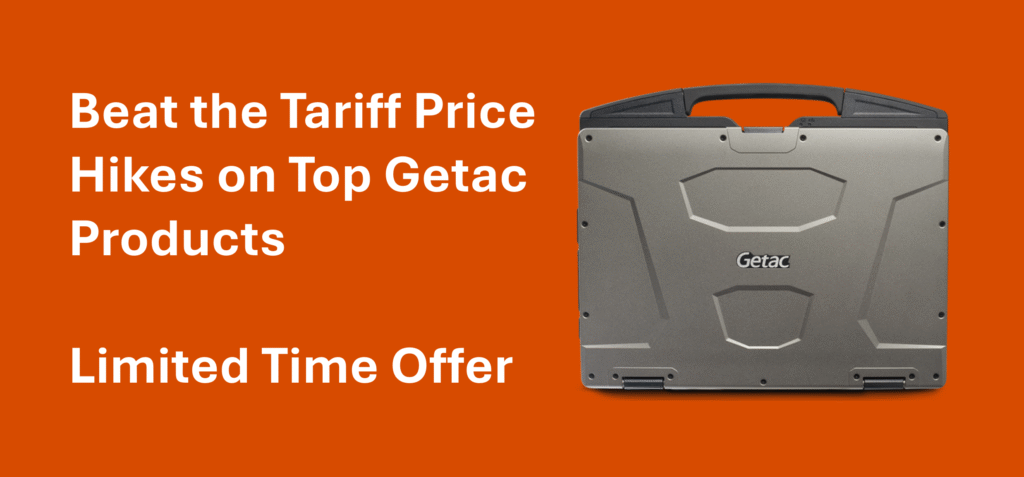
Beat the Tariff Price Hike on Top Getac Models – Limited Time Offer

As many of you are aware, new tariffs are beginning to impact pricing, and rugged tech is no exception. The good news? Getac has provided us with a list of AVAILABLE INVENTORY still priced at pre-tariff rates. This is a rare opportunity to secure the rugged devices you need before prices increase.


Important: This is a limited-time offer, and once this inventory is gone, the new higher pricing will take effect.


If your team is planning any upgrades, deployments, or replacements in the near future, now is the time to act. Let’s get ahead of the curve — and the cost.

Available inventory includes but is not limited to…


F110G7

The Getac F110 combines best-in-class performance, industry-leading security, a large 11.6″ display and a thin and light design that redefines rugged mobility.


V110G7

The Getac V110 is a Windows® 11 Professional fully rugged convertible laptop, ideal for users that go between an office setting and the field.


Getac S410 semi-rugged 14” laptop


S410G5

Deliver landmark performance, security, and durability to your team with the Getac S410 rugged 14” laptop.


S510

The S510-AI is durable, versatile, outdoor-ready, and ready to meet the needs of the automotive, law enforcement, manufacturing, utility industries, and field service professionals.


ZX10G2

The Getac ZX10 is a 10” fully rugged tablet featuring the Android™ 13 operating system. It is a slim upper-class tablet built for speed and efficiency.


Contact a Glacier Expert for specific models and additional products at pre-tariff prices—limited time offer, while supplies last.


Looking for something else? Glacier Computer is a Leader in Rugged Computing Solutions.

Contact us Today!


Dear Glacier Customers …

If you are considering a technology refresh for outdated or inefficient devices, please consider Glacier Computer for your data collection and identification technology solutions.

For over 23 years, many have benefited from our consultive input on the very best rugged computing hardware solutions. Our traditional product offerings will continue to include forklift-mounted terminals, rugged tablets, wearable and barcode scanners, printers, and handheld computers.

Wait, There’s More.

To this, we have added select partners that enable us to offer specific market solutions for asset management, RFID, cold chain, Hazardous environments, mobile applications for SAP, video capture, Mobile Data Terminals, and purpose-built custom product development. These solutions will provide a measurable improvement in productivity and labor efficiency.


Why Glacier:

  • Over 23 years of experience and expertise in the automated data collection and mobility space
  • Manufacturer of our own 6th generation forklift terminals and reseller of major OEM rugged tablets
  • One stop for all your rugged computing hardware needs
  • Flexibility in display size, OS, WiFi, cellular, bar code scanning, RFID and other input
  • Guidance on various mounting options for vehicles in the logistics and transportation sectors, including – warehouse forklifts, pallet jacks, yard trucks, and other vehicle types
  • Work closely and are part of the total solutions provided by ISVs and systems integrators
  • Ability to provide evaluation units from our demo pool to test your applications and use cases


If you are looking to upgrade current technology or explore what new solutions are available for your business, then contact Glacier Computer at 866-724-6257 x6 or visit our website glaciercomputer.com.


A Better Way to Reduce Supply Chain Product Losses

A BETTER WAY TO REDUCE SUPPLY CHAIN PRODUCT LOSSES

The International Trade Administration estimates approximately $750 billion in perishable product losses annually. Whether it is fresh produce, seafood, frozen food, or chemicals and pharmaceuticals, these supply chains require reliable hardware and real-time data that keeps product moving.

Keep the iPad in the lunchroom as it simply is not suited to this environment. The Glacier KODIAK x10 rugged computer is specifically engineered to meet the demands of refrigerated and freezer environments.

Whether on a forklift, pallet jack, or warehouse wall, the Kodiak x10 is engineered to live and work in cold environments. The x10 is equipped with a heated display for frost and fog-free operation and allows operators to use heavy gloves while the 12-48VDC integrated power supply, internal UPS, sealed I/O and integrated mounting system make the Kodiak x10 your ideal solution.

Talk to an expert about the full complement of products for your cold chain solution.


Four Ways Zebra ET4X Rugged Tablets Outperform Consumer Devices

For the past decade or more, the need to keep workers connected has been the driving force for businesses to adopt creative mobility solutions. From warehouse workers and delivery drivers to retail sales associates and healthcare staff, just about everyone is using mobile devices to access data, monitor workflows, and collaborate with others.

The proliferation of mobile devices doesn’t come cheap, however, especially when you’re outfitting a large share of your workforce. The cost equation has some decision-makers wondering if they can get by with consumer devices, which usually have a lower up-front cost, rather than enterprise-grade devices.

We are strong supporters of enterprise-grade devices for workplace applications simply because we’ve seen over and over how the total cost of ownership (TCO) is significantly lower over the long term. From durability to security to easier device management, the extra up-front investment pays off over time.  While there is a higher up-front cost, savings are experienced over the life of the products due to less breakage, less user downtime and minimal IT personnel involvement.

This is especially true when you consider Zebra’s lineup of ET4X Series, Android rugged tablets, which deliver enterprise-grade benefits at a value price point that makes it feasible to deploy them across a wide segment of workforce uses. Whether your applications call for the Wi-Fi only ET40 or the Wi-Fi/cellular ET45, you’ll have a choice of 8-inch or 10-inch screen sizes in a right-priced enterprise tablet that’s built for business.

Here are just four of the things that make Zebra’s ET4X lineup a better investment for business use than any consumer device:

Durability

Zebra’s ET4X tablets are rugged right out of the box, requiring no additional protection to withstand the handling that you must account for in workforce applications. They feature IP65 sealing for protection against dust and moisture, and they’re rated for 4-foot drops to concrete. To get anything approaching that level of drop protection in a consumer device, you’ll need to add a rugged boot at an additional cost.

Integrated Barcode Scanning

From retail to healthcare, many business workflows are streamlined with barcoding technology, but those benefits are hard to capture if your workers’ mobile devices offer only faulty camera-based scanning. Zebra’s ET4X tablets offer three integrated 2D scanner options—engineered by the experts in barcode technology—for optimal scanning performance with no added investment in bulky third-party scanning sleds or additional software licenses.

Longer Hardware Lifecycle

With consumer-level mobile devices, obsolescence is inevitable, with upgrades coming as frequently as every nine months. That spells disaster for workforce deployment: within just a few years, you’ll have several different models in use, creating major device management headaches. Zebra’s rugged enterprise tablets are engineered for a lifecycle that stretches at least 6 years, with complete support and security upgrades throughout, making them far easier for your IT staff to support and giving your workers a consistent experience from shift to shift.

Power Management and Battery Performance

The battery is one area where enterprise-grade devices usually separate themselves from consumer devices, and Zebra’s ET4X rugged tablets are no exception. In the standard configuration, both the ET40 and ET45 deliver full-shift battery performance, and an optional hot-swappable battery is available for even more power management flexibility. And note that Zebra’s devices feature user-replaceable batteries, so you won’t be stuck with the declining battery performance that’s common with aging consumer devices.

For more than 20 years, the Glacier team has offered the very best rugged computing solutions for the data collection marketplace. Zebra is a premier Glacier partner with solutions for every challenging application.  Please contact your Glacier sales rep for more information at https://glaciercomputer.com or call 866-724-6257.

Rugged Tablets Built for the Job – your job!

Glacier Computer continues to provide the best mobile workspace solutions, especially when the idea of working remotely does not involve wearing pajamas.

That mobile office demands data collection tools that are built to survive not just on the job but on your job with the features or accessories you need, tailored to your purpose.

Our service and support professionals can help you navigate the brands and options to address data collection needs across the operation, indoors or out .

Check out this month’s featured partner.