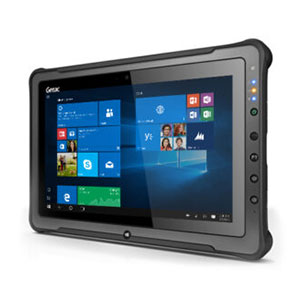
A Smart Choice for Industrial Mobility

Make Increasing Productivity Look Easy.
Performance, productivity, security, and rugged innovation are what you want and what we doCan anyone else turn any Android mobile phone into a rugged workstation? We did that. If there’s a data collection problem, Glacier probably has a solution, or we’ll help you find one. We even built some from scratch, a time or two. [Related: This is Good For Your Business and Your Bottom Line.]

Powered Carts Optimize Industrial Mobility.
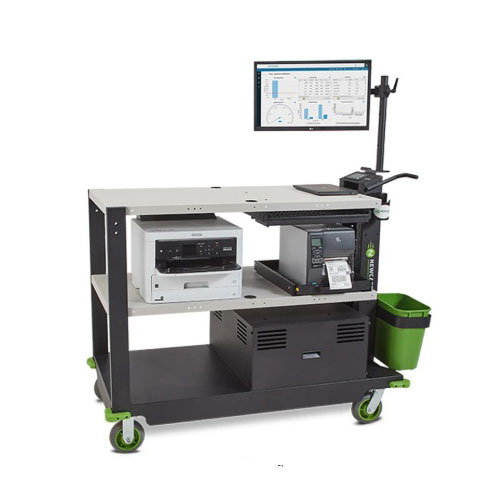
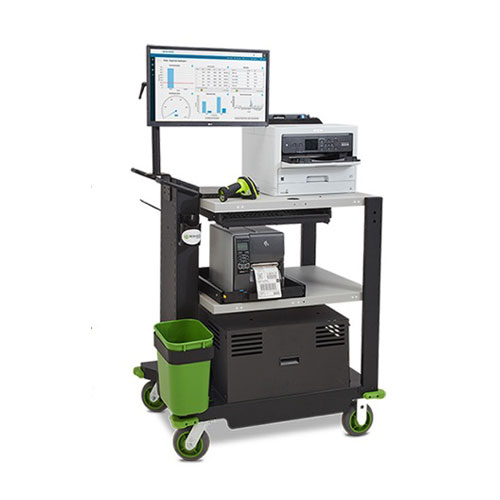
In today’s fast-paced warehouses, manufacturing floors, and distribution centers, mobility and dependable power are crucial. Powered Carts provide exactly that — tough, battery-powered mobile workstations built to keep teams productive without being tied to a wall outlet.

Warehouse workers can handle inbound receipts, pick orders, and label shipments right at the pallet or rack, cutting down on unnecessary walking – increasing efficiency. Manufacturers rely on Powered Carts for quality control checks on the production line, while logistics teams value their ability to move heavy printers or multiple devices without stopping. [Related: From Potential Liabilities to Smart, Safety-First Assets]

At the heart of many Newcastle carts is the Sealed Lead Acid (SLA) battery option. SLA batteries provide a cost-effective power source with proven reliability. They deliver consistent runtime — often 8–12+ hours depending on the configuration and load — making them ideal for full shifts in busy operations. While lithium alternatives offer lighter weight and longer lifespan, SLA remains the go-to for businesses seeking lower upfront costs and straightforward performance.

Newcastle’s SLA-powered carts excel in real-world uses. Warehouse workers can handle inbound receipts, pick orders, and label shipments right at the pallet or rack, cutting down on unnecessary walking and increasing efficiency. Manufacturers rely on them for quality control checks on the production line, while logistics teams value their ability to move heavy printers or multiple devices without stopping.

Key Features include

  • Durable construction built to withstand daily industrial use
  • Integrated power strips with proper cord management
  • Configurable shelving and accessories
  • Easy battery access for maintenance
  • 8-12+ hours of battery life (depending on the configuration and load)
  • Sealed Lead Acid or Lithium Power pack options

A powered Newcastle cart is an investment in flexibility. Teams remain mobile, errors decrease, and productivity rises. Whether you need a compact entry-level model or a heavy-duty workstation capable of supporting larger equipment, Newcastle’s options deliver reliable power at an affordable price.

Modernize without overspending. Contact a Glacier expert to find out how Newcastle Powered Carts provide a practical, proven solution that keeps your workflow running smoothly — shift after shift.

—–

Check out the lineup of rugged tabletshandheldslaptops, scanners, or mounted terminals. Glacier also offers Intrinsically Safe and AI-ready devices, as well as Managed Services. Ask us about how Glacier solutions can help your business thrive in almost any environment.


Follow us on LinkedIn or Facebook.
Battery Management: Good For Your Business and Your Bottom Line

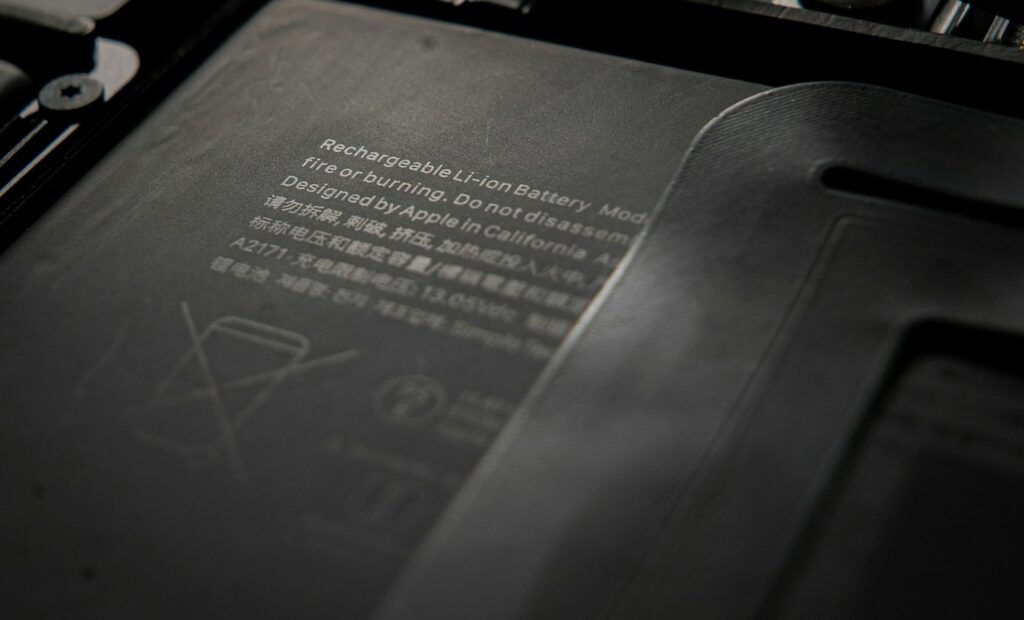
Device battery management has become a culturally ubiquitous phenomenon. Nearly everyone has devices, from mobile phones to smartwatches, tablets, and laptops, but not everyone knows how to manage their battery life effectively. That’s not your problem unless it’s your equipment. Mobile data collection, especially fieldwork, requires power that lasts throughout the day. Do you have a plan to maximize not just charging life, which is how long a battery lasts after each charge, but also battery life, the number of healthy charging cycles a battery can handle before needing replacement?

battery life

They are connected and inseparable, and if you invest in rugged technology, having it power down or “fail” due to power loss from tired batteries impacts the operation.

Smart Charging Habits can double battery lifespan by reducing cycle wear and preventing thermal damage. Limit charges to 80% to minimize cell stress. Avoid full discharges below 20% or overcharging. Use only manufacturer-approved chargers and charge at room temperature (avoid temperatures below 0°C/32°F or above 40°C/104°F). For storage, keep at 40-50% in a cool, dry place.

Regular Maintenance and Calibration can ensure accurate charge readings and identify issues early, maintaining 95%+ performance accuracy. Calibrate every 2-3 months by fully charging, then discharging to 0%, and finally recharging. Clean the battery contacts with alcohol wipes. Run diagnostic tools (e.g., Dell Power Manager or Windows Battery Report) to monitor the battery’s health. Update the firmware/OS for efficiency fixes.

You can also manage power settings to optimize long-shift runtime and minimize temperature extremes when possible. Leaving them in a vehicle in direct sunlight accelerates degradation; for optimal results, try to charge them at a stable or room temperature.

    • Battery health monitoring: Use built-in diagnostics to track charge cycles and proactively replace degrading batteries.
    • Efficient processors: Choose devices with low-power, high-performance CPUs (e.g., ARM or Intel vPro platforms).
    • Adaptive brightness: Automatically adjust screen brightness based on ambient light to reduce power draw.
    • CPU throttling: Enable performance profiles that scale processor speed depending on workload.
    • Peripheral control: Disable unused radios (Wi-Fi, Bluetooth, GPS) and ports when not in use.
    • Temperature-aware charging: Avoid charging in extreme hot or cold environments that degrade battery chemistry.
    • Smart charging accessories: Use ruggedized docking stations or vehicle chargers designed to regulate voltage
    • Sealed enclosures: Prevent dust, water, and vibration from damaging the battery or connectors.
    • Field-ready power sources: Carry portable, rugged power banks or solar chargers for remote operations

Contact one of our experts if you are interested in learning more about all the ways to help extend charge times and battery life. They won’t all be ideal for your operation, but at least a few of them will. It won’t cost you anything, and you could end up saving money by extending the life of your batteries and reducing lost time in the field or on the floor.


Why Durability Matters: The Case for Rugged Devices in Extreme Conditions

In industries where uptime and reliability are mission-critical, device durability is more than a convenience—it is essential. Standard consumer laptops and tablets are not designed to withstand the environmental stresses faced in construction, field services, oil and gas, defense, transportation, and emergency response. Rugged devices, however, are purpose-built for these conditions, providing a distinct advantage in performance, safety, and long-term value.

Engineered for Harsh Environments

Rugged laptops and tablets undergo MIL-STD-810 testing to confirm their resistance to shock, vibration, and repeated drops. Many also achieve IP ratings for protection against dust, water, and humidity. This engineering ensures they remain functional in environments ranging from deserts and offshore rigs to arctic conditions, where standard devices are often prone to overheating, freezing, or system failure.

Reliable Performance in Mission-Critical Operations

Rugged devices are optimized for field performance, with extended operating temperature ranges, reinforced components, and high-visibility displays that remain usable in direct sunlight. Features such as glove- and wet-touch compatibility, hot-swappable batteries, and expanded I/O options allow seamless operation in situations where failure is not an option. Enhanced connectivity—via 5G, LTE, GPS, and advanced antenna systems—further supports teams working in remote or mobile environments.

Total Cost of Ownership Advantages

While rugged devices usually require a higher initial investment, they offer a significantly lower total cost of ownership (TCO). Standard consumer devices often need frequent repairs or replacements when exposed to tough conditions, leading to unexpected downtime and higher maintenance expenses. Rugged systems improve lifecycle performance, decrease field disruptions, and provide measurable ROI through increased reliability.

Supporting Safety and Productivity

In high-stakes industries, technology failures can jeopardize worker safety and disrupt vital operations. Rugged devices help reduce these risks by providing reliable access to digital tools, data, and communication. Their ability to function under pressure directly boosts operational efficiency, safety for workers, and overall mission success.

Conclusion

Durability is more than just a feature — it’s a critical foundation for productivity and safety in tough environments. Rugged laptops and tablets surpass standard consumer-grade devices by offering resilience, dependability, and long-term cost savings. For organizations working in extreme conditions, investing in rugged technology is not optional; it’s necessary.

Not sure where to start? Reach out to one of our experts!

Glacier Computer Can Help You Get Your C1D1 Groove Back

SC9 EX1 handheld C1 D1

With fewer options in the Intrinsically Safe space, Glacier’s got you covered.

Operations that rely on rugged, intrinsically safe hardware for communication, Inspection, and data collection have a limited selection of tools to tap into. However, Glacier Computer offers a handful of C1/D1 handhelds that can do the job, but none quite like the Bartec SC9 EX1.

The Bartec SC9 EX1 Smartscanner is the world’s most compact 5G smartphone designed for professionals in high-risk industries such as oil and gas, chemical plants, and industrial inspection.

  • Oil & Gas: Ensure safe, efficient data collection in hazardous zones.
  • Chemical Plants: Monitor and document operations without compromising safety.
  • Industrial Inspection: Capture high-resolution images and data in complex environments.
  • Warehouse and Inventory Management: Streamline inventory tracking with advanced scanning

Certified for ATEX/IECEx Zone 1/21 and NEC Class I, II, III, Division 1, this intrinsically safe device guarantees uncompromised safety and performance in explosive environments.

  • ATEX: II 1G Ex ia op is IIC T4 Ga, II 2D Ex ia op is IIIC T135°C Db IP64
  • IECEx: Ex ia op is IIC T4 Ga, Ex ia op is IIIC T135°C Db IP64
  • NEC/CEC 500/505: Class I, Div 1, Groups A, B, C, and D; Class II, Div 1, Groups E, F, and G; Class III, T4; Zone 0, AEx ia op is IIC T4 Ga; Zone 21, AEx ia op is IIIC T135°C Db

Powered by the Qualcomm QCM6490 Octa-Core processor, 8GB of RAM, and 128GB of storage, the SC9 EX1 offers lightning-fast performance. Its integrated Zebra SE55 Advance Range Scan Engine captures 1D and 2D barcodes from up to 12 meters away, revolutionizing inventory management and data collection. And the Android 13 OS with life cycle support ensures seamless updates and compatibility with enterprise mobility solutions.

The Bartec SC9 EXI’s 6.1” AMOLED display is shielded by Gorilla® Glass Victus® (Gen 8), to provide crystal-clear visuals even in bright sunlight, while the IP68 and MIL-STD-810H certifications guarantee durability against water, dust, and drops. Capture every detail with the 48MP auto-focus rear camera, which supports 4K video and low-light imaging—ideal for inspections and documentation. The 8MP front camera facilitates high-quality video calls, and dual loudspeakers cut through noisy environments.

With 5G and Wi-Fi 6 (802.11a/b/g/n/ac/ax) connectivity, the SC9 EX1 ensures real-time data transfer and communication. Its lightweight, ergonomic design maximizes all-day productivity, complemented by versatile accessories such as protective cases and charging docks. Whether you’re streamlining warehouse operations or conducting safety inspections, the Bartec SC9 EX1 is your ultimate tool for precision, safety, and efficiency.

Talk to an Expert about your C1/D1 Data Collection Needs

View the SC9 EX1 Spec Sheet

Exciting News: Glacier Computer Joins Logic Instruments!

Dear Friends and Associates,

I am excited to share some incredibly important news with you. GLACIER COMPUTER LLC is now officially part of LOGIC INSTRUMENTS based in Paris! This marks an exciting new chapter in our company’s journey and opens up new opportunities for growth and innovation.

For over 25 years, Glacier has been proud to provide rugged computing solutions that meet the unique needs of our customers. As we join forces with Logic Instruments, we are poised to build on that foundation and bring even more depth, expertise, and resources to our operations. Together, we’ll be able to enhance our offerings and continue delivering world-class solutions while retaining the personalized service and attention that has been the hallmark of Glacier.

Rest assured, U.S. customers will continue to experience the same commitment from our knowledgeable and dedicated team, now with the added benefits of Logic Instruments’ expansive global network, products, services, and buying power.

About Logic Instruments:
Founded in 1987, Logic Instruments is a leading provider of rugged laptop solutions and mobility solutions for industries that require dependable and robust computing in extreme environments. With offices across France, Germany, and the UK, Logic Instruments’ global reach and extensive network of partners will support Glacier’s growth and enable us to offer even more to our customers.

As I transition to this next phase, I will remain involved for the next year to ensure that this integration process goes smoothly and that we continue to maintain the high standards our customers and partners have come to expect from Glacier. I’m genuinely excited about what the future holds and I look forward to seeing us all grow together with the combined strength of Glacier and Logic Instruments.

Thank you for your ongoing support during this exciting transition. I’m thrilled to embark on this next chapter with all of you!

Warm regards,

Ron D’Ambrosio

President

Warehouse Operators Guide to SAP Workforce Mobility


Learn More: Contact an Expert!

The Glacier Blog is Back!

We’ve got a new theme, a new look, and while there is still some remodeling left to complete, the Glacier blog is back.

under construction

New content is arriving soon so stay connected with expanded social media sharing or sign up for email updates.

The Glacier Blog is Back – Win an Android Tablet

Just a quick note to inform everyone that the Glacier Blog is back.  We were down for a few months but everything appears to have been corrected.

Please check back for  updates on new product announcements.  We are also giving away  a rugged Android tablet (pictured).  Just follow us on Twitter by July 4th for your chance to win.


Glacier Technology Tuesday: Quantum Computing

quantum-computing - Image Credit: physicsworld.com
Image credit: physicsworld.com

Quantum computing uses atomic level particles to do the heavy lifting, where speed and power could be significantly greater, superior to any current ‘super computer.’  So the desire to design a full sized quantum computer has kept scientist, engineers, and physicists occupied with the potential.

And there’s progress to report.

From Science World Report

The so-called boson sampling computer utilizes photons, a particular type of bosons. These particles have high mobility, which makes them extremely valuable in a quantum computer. In order to create the boson sampling computer, the researchers inserted photons into a complex optical network where they could propagate along many different paths.

Continue reading

Need to Jump Start A Project? Try This.

Jon Bell over at medium.com has presented an interesting solution to an often vexing problem.   The problem is “getting started.”  Trying to get your team, or just yourself, out of the gate and moving forward.  Whether you are in  search of a new idea, trying to develop a plan, or just deciding where to go to lunch, getting out the door can be a challenge.  To address this mental roadblock, Jon uses what he calls “McDonald’s Theory.”

Jon Explains…

I use a trick with co-workers when we’re trying to decide where to eat for lunch and no one has any ideas. I recommend McDonald’s.

An interesting thing happens. Everyone unanimously agrees that we can’t possibly go to McDonald’s, and better lunch suggestions emerge. Magic!

It’s as if we’ve broken the ice with the worst possible idea, and now that the discussion has started, people suddenly get very creative. I call it the McDonald’s Theory: people are inspired to come up with good ideas to ward off bad ones.

I have a warm spot in my stomach for McDonald’s so that might not work for me, and this would never work on a group of high school kids, but in the business world this idea has merit; doing anything to start the process is always better than doing nothing.  And if you have the sense, or even just the courage, to risk coming up with the worst possible idea, just so you can stimulate better ones, then that’s called leadership.

More from Jon..

The next time you have an idea rolling around in your head, find the courage to quiet your inner critic just long enough to get a piece of paper and a pen, then just start sketching it. “But I don’t have a long time for this!” you might think. Or, “The idea is probably stupid,” or, “Maybe I’ll go online and click around for—”

No. Shut up. Stop sabotaging yourself.

The same goes for groups of people at work. The next time a project is being discussed in its early stages, grab a marker, go to the board, and throw something up there. The idea will probably be stupid, but that’s good! McDonald’s Theory teaches us that it will trigger the group into action.

You have to be out in front to lead.  So get out there.  Lead.  Right after you have some lunch.