
If you missed our battery management overview in October, this is a great time to revisit it and provide product-specific information following a customer issue with battery life. They report going through batteries at a “rapid rate” on units that are primarily left in the dock and connected to power all of the time.
From the guidance we shared in October,
Smart Charging Habits can double battery lifespan by reducing cycle wear and preventing thermal damage. Limit charges to 80% to minimize cell stress. Avoid full discharges below 20% or overcharging. Use only manufacturer-approved chargers and charge at room temperature (avoid temperatures below 0°C/32°F or above 40°C/104°F). For storage, keep at 40-50% in a cool, dry place.
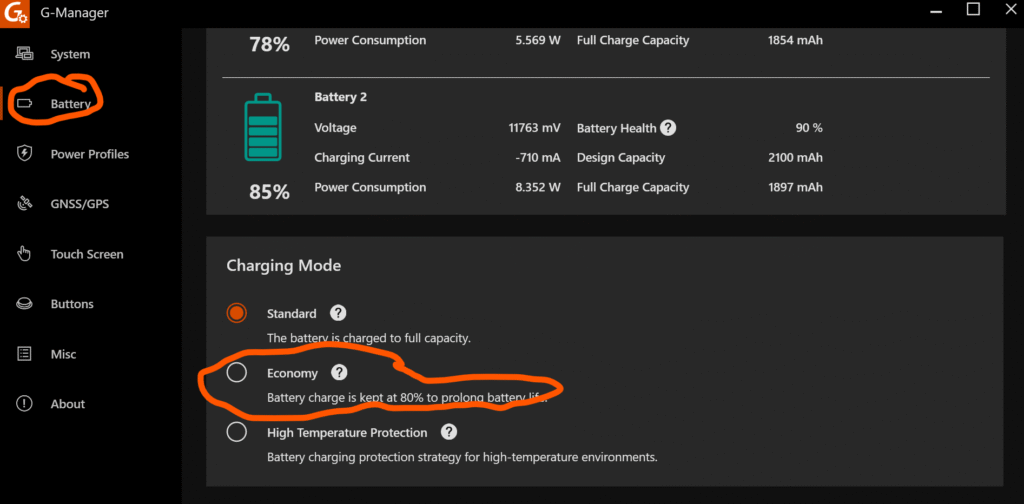
It is also recommended that you discharge and manually calibrate the batteries in your tablets, laptops, and handhelds every two to three months. Your rugged devices include settings management software, and while they won’t remind you to do that, you can automate functions to optimize battery life. In the example above, the Getac F110 G-Manager has a battery settings options page that lets you set the charging mode to economy.
.
.
For always-powered-on Rugged Tablets in cradles, like the example above, this feature will extend battery life for operations that require tablets or laptops to remain always-on and ready, say, in medical or public safety environments where on-call demand requires the device to be available at a moment’s notice.
That’s not a use case where you want to experience battery failure in the middle of a call or an emergency, even when you’ve got warm or hot swap capability. And it doesn’t necessarily represent the majority of users or uses, but good Battery Management is Good For Your Business and Your Bottom Line, no matter what your business.
Check out our October overview on battery management for more tips, tricks, and hints to help you get the most out of your batteries and devices.
And check out the Glacier blog for more news, tips, industry updates, and more.
.
Contact one of our experts to learn more about this or to ask any rugged device, logistics, or data collection questions.
.