
Forklift operator tablet damage is rarely the operator’s fault. Consumer tablets fail on forklifts because the truck itself attacks them: constant vibration, unstable vehicle power, impacts with racking, temperature swings, dust, and charging ports that were never meant to be used in motion. Rugged tablets and vehicle-mount computers are engineered for exactly those conditions, which is why they stay in service long after a consumer tablet has been replaced.
In brief
- The cause is the environment, not carelessness. Seven stresses do the damage, and most of it builds up inside the device before anyone sees it.
- A rugged case does not fix it. A case helps with drops. It does nothing about vibration, vehicle power, temperature, or connector wear.
- There are two right answers. A rugged tablet suits operators who leave the truck with the device. A vehicle-mounted computer suits trucks where the computer never comes off.
- Compare total cost, not purchase price. Downtime, lost transactions, and redeployment labor usually cost more than the tablet.
What causes forklift operators to damage consumer tablets so often?
Forklift operators damage consumer tablets so often because a forklift exposes the device to seven stresses it was never designed for: vibration, unstable power, impact, connector wear, temperature swings, contamination, and a touchscreen that does not work with gloves or glare. Most of the damage accumulates inside the tablet over weeks. When it finally fails, it looks like sudden breakage or operator misuse, but the cause was the installation.
1. Constant vibration and shock
Forklifts ride on solid or cushion tires with no suspension. Every dock plate, floor joint, and pallet drop travels straight through the chassis into whatever is bolted to it. Consumer tablets are designed to survive an occasional drop, not eight hours of vibration per shift.
The result is cracked solder joints, loosened internal connectors, and screens that fail with no visible cause. Forklift vibration also differs from road-vehicle vibration, so a mount designed for a delivery van can pass that vibration straight to the device.
2. Unstable vehicle power
A forklift is a hostile power source. Electric trucks run on battery packs from 24V to 80V. Internal combustion trucks run on 12V systems that dip sharply when the engine cranks. Voltage also sags when the hydraulic pump starts a lift.
A consumer tablet expects a clean 5V USB supply, so it needs an add-on DC converter, and every converter, cable, and plug is another point of failure. The symptoms are familiar: random mid-task reboots, lost warehouse management system (WMS) sessions, tablets dead on Monday morning, or a truck battery the tablet drained over the weekend.
3. Impacts and drops
Forklifts hit racking uprights, door frames, and trailer walls, and a mounted tablet often sits directly in that path. Tablets that leave the truck get dropped on concrete. Thin glass and aluminum housings aren’t built for either.
4. Charging ports that wear out
Consumer tablets charge through a USB-C or Lightning port designed for a desk. On a forklift, a cable hanging from a vibrating tablet works the port loose until charging becomes intermittent, then stops. Hurried docking and undocking finish the job. Rugged devices avoid the problem with docking contacts and locking connectors.
5. Temperature swings and condensation
Apple specifies an ambient operating range of 32°F to 95°F for iPad. Freezers, unheated docks, and summer trailers all fall outside it. Moving between a freezer and an ambient dock also forms condensation on and inside the device, and lithium-ion batteries should not be charged below freezing.
6. Dust, liquids and cleaning chemicals
Warehouses produce cardboard dust, pallet debris, hydraulic fluid and washdown spray. Many consumer tablets have no ingress protection (IP) rating, and their open ports and speaker grilles let contamination in. Rugged forklift devices are typically sealed to IP65 or higher, meaning dust-tight and protected against water jets.
7. Gloves, glare and a screen that fights the operator
Standard capacitive touchscreens do not register work gloves and wash out in the sunlight at dock doors. Operators respond by pressing harder, tapping with a scanner or pen, or pulling the tablet off its mount to read it. Each workaround adds physical damage. Rugged devices offer glove and wet-touch modes or resistive touch, plus displays in the 1,000-nit class.
Why a rugged case does not solve the problem
A rugged case is tablet protection against drops and scratches, and that is all. It does not stop vibration from reaching internal components, condition vehicle power, widen the temperature range, or protect the charging port. Cases can also trap heat. A cased consumer tablet on a forklift is still a consumer tablet.
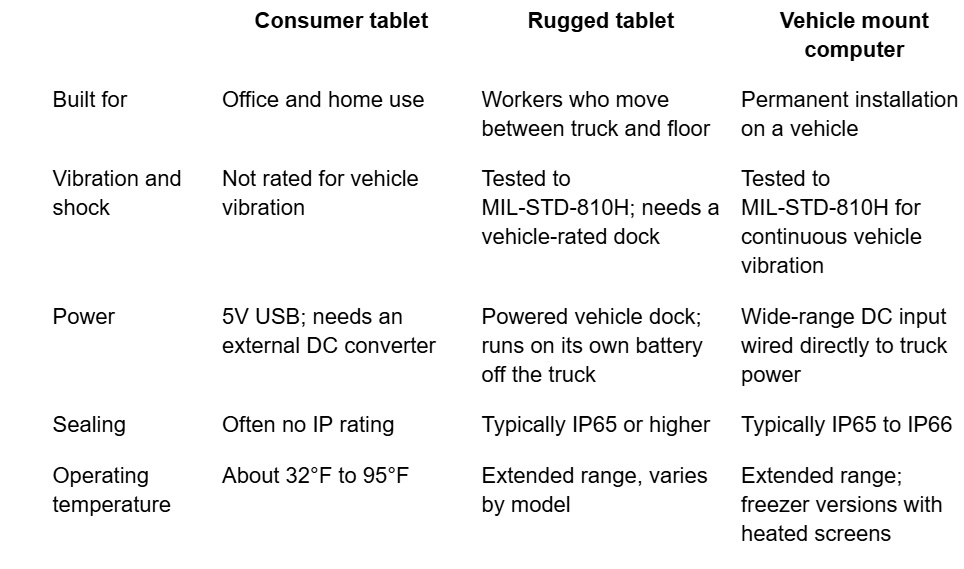
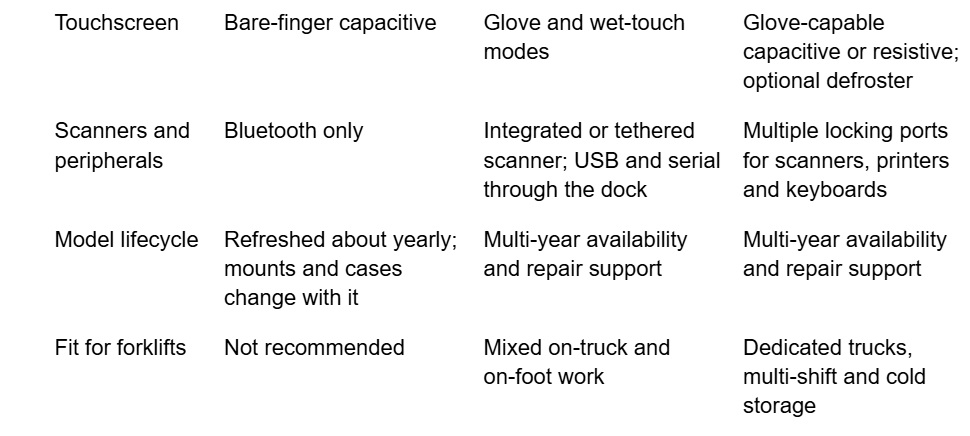
Consumer tablet vs. rugged tablet vs. vehicle mount computer
A consumer tablet is built for a desk, a rugged tablet for a worker on the move, and a vehicle mount computer for a working life bolted to a truck. The differences that matter on a forklift are below.
.
.
Rugged tablet or vehicle mount computer: which is right for your forklift fleet?
Choose a rugged tablet when operators regularly leave the truck with the device. Choose a vehicle mount computer when the computer stays on the truck. Many forklift operations run both.
A rugged tablet in a vehicle dock fits when:
- Operators get off the truck to cycle count, receive, or inspect loads with the same device.
- One device type needs to serve forklift operators and floor staff.
- The workflow uses the camera, signature capture, or photos of damaged freight.
A vehicle-mounted computer fits when:
- The truck is dedicated to putaway, replenishment, or loading across multiple shifts.
- The truck works in a freezer or moves between cold and ambient zones.
- Scanners, printers or keyboards are hard-wired to the truck.
- You want nothing an operator can drop, lose, or walk away with.
The trade-off is simple. Every time a tablet leaves its dock, it can be dropped, and every docking cycle wears the connection. If the device never needs to leave the truck, a fixed vehicle mount computer removes both risks.
What should you look for in a forklift mobile computer?
Look for eight things: a vibration rating, forklift-ready power, sealing, temperature range, a usable screen, a purpose-built mount, software fit, and long-term support. Use this list to compare spec sheets on workplace device durability, not only on price.
- Vibration and shock. Ask for MIL-STD-810H test results, and ask whether the device and its mount were tested on forklifts, not only on road vehicles.
- Power. The input range should match your trucks, from 12V internal combustion models to 24V–80V electric models. Look for ignition sensing so the computer cannot drain the truck battery, and a backup battery or UPS so it rides through voltage dips and battery swaps.
- Sealing. IP65 is the practical minimum for a warehouse. Choose IP66 or higher for washdown or outdoor yards.
- Temperature. The operating range should cover your coldest and hottest zones. Freezer trucks need a heated or defrosting screen.
- Display and touch. A 10-inch-class screen is the forklift standard. Look for about 1,000 nits of brightness for docks and yards, and a touchscreen that works with gloves.
- Mount and dock. Choose a forklift-specific mount, a locking dock, and power routed through the mount instead of loose cables.
- Software and peripherals. Confirm the operating system your WMS supports (Android or Windows), terminal emulation if you use it, ports for scanners and printers, and mobile device management.
- Lifecycle and support. Ask how long the model will be sold, what the warranty covers, how fast repairs turn around, and whether spares are stocked.
How should a forklift computer be mounted and powered?
Mount the computer on a structural part of the truck, out of the operator’s forward sight line, and power it from its own fused circuit. A poor mount or power feed can damage industrial tablets, even on rugged devices.
Mounting
- Keep the sight line clear. OSHA 29 CFR 1910.178 requires the driver to keep a clear view of the path of travel. The screen should sit to the side of the operator’s view of the forks and load.
- Use structural mounting points. The overhead guard or cab frame carries less vibration than the mast or thin panels. Never mount on the mast or carriage.
- Clamp, do not drill. The same OSHA standard requires the truck manufacturer’s written approval for modifications that affect safe operation. Clamp-style mounts avoid drilling or welding the overhead guard.
- Keep the arm short. A long mounting arm acts as a lever and amplifies vibration at the device.
- Lock the dock. A device that comes loose in an impact becomes a hazard to the operator.
- Re-check fasteners. Vibration loosens hardware. Inspect and re-torque mounts after the first few weeks, then on a schedule.
Power
- Use a dedicated fused circuit from the battery, not a tap on the lights or horn.
- Match the power supply to the truck. Use a wide-input or isolated supply rated for the truck’s voltage and its dips during lifting and cranking.
- Add ignition sensing or a shutdown timer so the device powers down with the truck.
- Route cables through the mount and away from the mast, pedals, and pinch points.
- Test under load. Lift and tilt a full pallet while using the screen and scanner before you sign off on the install.
What does forklift tablet damage really cost?
The replacement tablet is usually the smallest part of the cost. Warehouse equipment damage of this kind is expensive because of what stops while the device is down.
- Downtime. A truck without a working computer either sits idle or falls back to paper, and the operator’s shift goes with it.
- Lost transactions. A reboot mid-task can drop or duplicate a WMS transaction, which then has to be found and corrected.
- Redeployment labor. Each replacement has to be imaged, enrolled in device management, configured, and shipped to the site.
- Accessories bought twice. Consumer models change about yearly, so the mount, case, and power kit often have to be replaced along with the tablet.
- Spares. Fleets with high failure rates carry more spare devices on the shelf.
- Safety exposure. Loose cables and devices that come off their mounts create hazards in the operator compartment.
To compare options fairly, count failures per truck per year, then add the hardware, accessory, IT labor, and downtime cost of each failure. A rugged device costs more on day one and usually less over a three-to-five-year deployment. Fleets on a fixed budget can close the gap with certified refurbished rugged devices or a Device-as-a-Service subscription.
How Glacier Computer equips forklift fleets
Glacier Computer has supplied rugged computers for more than 25 years, with a specific history in forklift computing. The company engineered six generations of its own vehicle-mounted computers and reports more than 50,000 units installed on gas and electric forklifts, trucks, and port equipment.
Today Glacier is supplier-agnostic. Its specialists match the device to the truck, the environment, and the WMS, drawing on manufacturers including Zebra, Honeywell, RuggON, Getac, and Panasonic.
.
Forklift-ready devices from Glacier
| Device | Type | Operating system |
| Zebra VC8300 10-Inch | Vehicle mount forklift terminal | Android |
| Zebra VC80x | 10.4-inch vehicle mount forklift computer | Android |
| RuggON Vulcan 10A | AI-ready vehicle mount computer | Android |
| RuggON Vulcan 10X | Vehicle mount computer | Windows |
| Zebra ET60/65 | Rugged 10-inch tablet for mobile and fork truck use | Android |
.
Glacier also handles the work around the hardware: device installation, mobile device management, image loading, repair triage, and a Device-as-a-Service program with a three-year refresh cycle and next-business-day replacement.
Talk to a forklift computing specialist: call 866.724.6257 or request a quote. See the full range of vehicle-mounted computers and rugged tablets.
Frequently asked questions
What causes forklift operators to damage consumer tablets so often?
The forklift causes most of the damage, not the operator. Constant vibration, unstable vehicle power, impacts, charging-port wear, temperature swings, dust and liquids, and screens that do not work with gloves all break down a consumer tablet. Rugged tablets and vehicle-mount computers are designed and tested for those conditions.
Can you use an iPad or consumer Android tablet on a forklift?
You can mount one, but it is not built for the job. Consumer tablets are not rated for vehicle vibration, need an add-on power converter, and often have no IP rating. Apple specifies a 32°F to 95°F operating range for iPad, which rules out freezers and many docks.
Will a rugged case protect a consumer tablet on a forklift?
A rugged case protects only against drops and scratches. It won’t prevent vibration damage to internal components, fix unstable vehicle power, extend the temperature range, or protect the charging port.
What is the difference between a rugged tablet and a vehicle mount computer?
A rugged tablet is a portable device that docks on the truck and leaves with the operator. A vehicle-mount computer is fixed to the truck, wired directly to truck power, and built for continuous vibration. Tablets suit mixed on-truck and on-foot work, while vehicle-mount computers suit dedicated trucks.
Why does a forklift tablet reboot when the truck lifts a load?
The hydraulic pump draws heavy current when a lift starts, and the truck’s voltage briefly sags. A tablet fed by a basic DC converter sees that sag as a power loss and resets. Forklift-rated computers use wide-range power supplies and backup batteries to ride through it.
What IP rating does a forklift computer need?
IP65 is the practical minimum for warehouse forklifts. It means the device is dust-tight and protected against water jets. Choose IP66 or higher for washdown areas and outdoor yards.
What voltage do forklift computers run on?
Internal combustion forklifts typically provide 12V. Electric forklifts provide 24V to 80V depending on the truck class. Vehicle-mount computers accept a wide DC input range, so one model can cover most of a mixed fleet, sometimes with a converter for the highest-voltage trucks.
Do forklift computers work in freezers and cold storage?
Purpose-built models do. Cold storage forklift computers use extended-temperature components and heated or defrosting screens that stay readable when the truck moves between freezer and dock. Consumer tablets are not designed for sub-freezing use.
Where should you mount a tablet or computer on a forklift?
Mount it on the overhead guard or cab frame, to the side of the operator’s forward view. Avoid the mast and carriage. Use a short arm, a clamp-style mount, and a locking dock, and confirm the operator can still see the forks and the path of travel.
Is a refurbished rugged tablet better than a new consumer tablet for forklift use?
In most forklift applications, yes. A certified refurbished rugged tablet keeps its sealing, vibration rating, and vehicle dock support at a price closer to consumer hardware. Glacier Computer stocks certified refurbished rugged devices with support included.
Explore our lineup of rugged tablets, handhelds, laptops, scanners, and mounted terminals. Glacier also offers Intrinsically Safe and AI-ready devices, as well as Managed Services. Ask us how Glacier solutions can help your business thrive in almost any environment.